
Tag Archives: BI Publisher
The Business Value In Training
One of the main things I get asked to do here at Rittman Mead, is deliver the OBIEE front-end training course (TRN 202). This a great course that has served both us, and our clients well over the years. It has always been in high demand and always delivered with great feedback from those in attendance. However, as with all things in life and business, there is going to be room for improvement and opportunities to provide even more value to our clients. Of all the feedback I receive from delivering the course, my favorite is that we do an incredible job delivering both the content and providing real business scenarios on how we have used this tool in the consulting field. Attendees will ask me how a feature works, and how I have used it with current and former clients, 100% of the time.
This year at KSCope ’14 in Seattle, we were asked to deliver a 2 hour front-end training course. Our normal front-end course runs a span of two days and covers just about every feature you can use all the way from Answers and Dashboards, to BI Publisher. Before the invitation to KScope ’14, we had bee tooling with the idea to deliver a course that not only teaches attendees on how to navigate OBIEE and use it’s features, but also emphasizes the business value behind why those features exist in the first place. We felt that too often users are given a quick overview of what the tool includes, but left figure out on their own how to extract the most value. It is one thing to create a graph in Answers, and another to know what the best graph to use might be. So in preparation for the KScope session, we decided to build the content around not only how to develop in OBIEE, but also why, as a business user, you would choose one layout/graph/feature over another. As you would expect, the turn out for the session was fantastic, we had over 70 plus pre-register, with another 10 on the waiting list. This was proof that there is an impending need to pull as much business value out of the tool as there is to simply learn how to use it. We were so encouraged by the attendance and feedback from this event, that we spent the next several weeks developing what is called the “Business Enablement Bootcamp”. It is a 3 day course that will cover Answers, Dashboards, Action Framework, BI Publisher, and the new Mobile App Designer. This is an exciting time for us in that we not only get show people how to use all of the great features that are built into the tool, but to also incorporate years of consulting experience and hundreds of client engagements right into the content. Below I have listed a breakdown of the material and the value it will provide.
Answers
Whenever we deliver our OBIEE 5-day bootcamp, which covers everything from infrastructure to the front end, Answers is one of the key components that we teach. Answers is the building block for analysis in OBIEE. While this portion of the tool is relatively intuitive to get started with, there are so many valuable nuances and settings that can get over looked without proper instruction. In order to get the most out of the tool, a business user needs be able to not only create basic analyses, but be able to use many of the advanced features such as hierarchical columns, master-detail, and selection steps. Knowing how and why to use these features is a key component to gaining valuable insight for your business users.
Dashboards
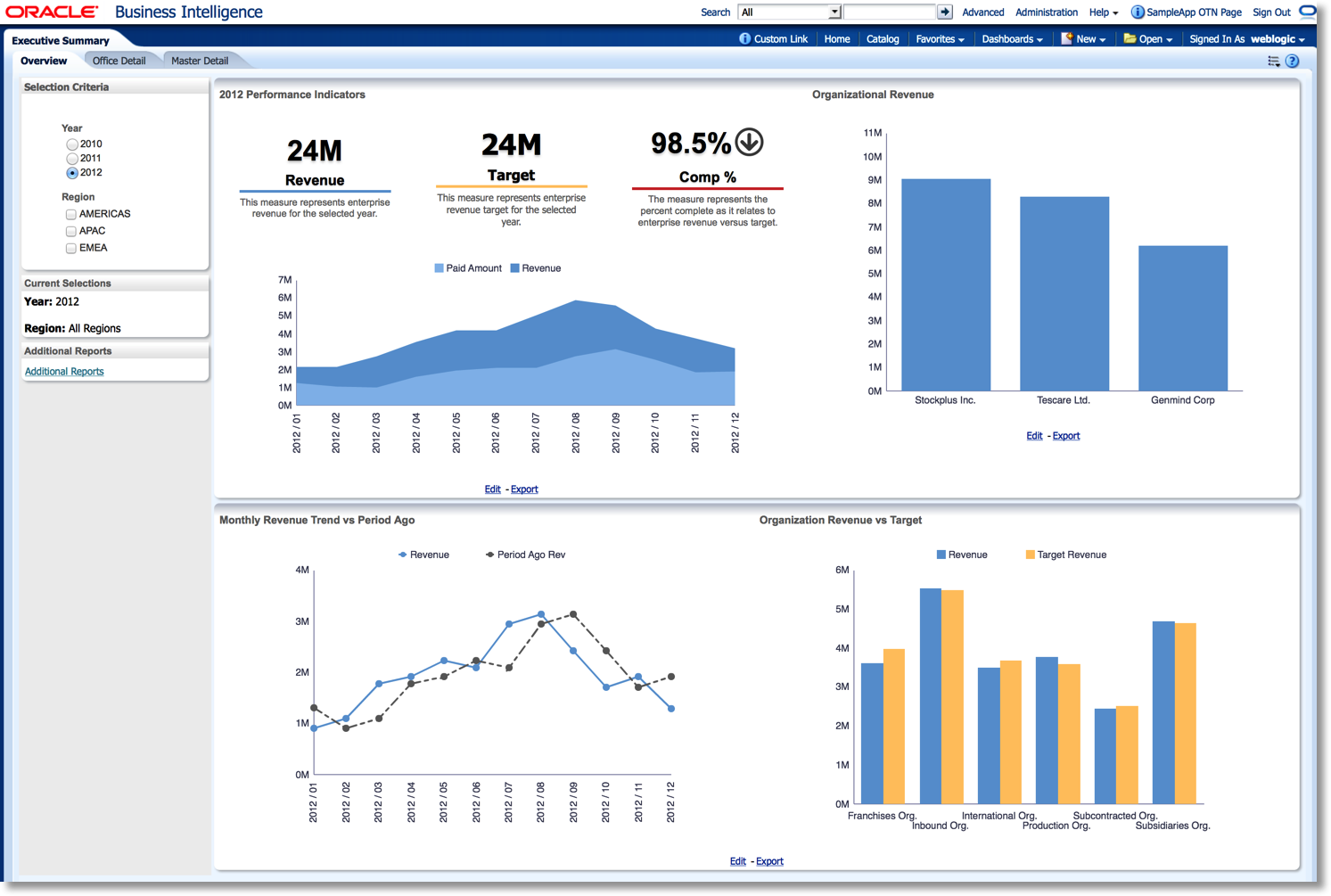
This one in particular is dear to my heart. To create an analysis and share it on a dashboard is one thing, but to tell a particular story with a series of visualizations strategically placed on a dashboard is something entirely different. Like anything else business intelligence, optimal visualization and best practices are learned skills that take time and practice. Valuable skills like making the most of your white space, choosing the correct visualizations, and formatting will be covered. When you provide your user base with the knowledge and skills to tell the best story, there will be no time wasted with clumsy iterations and guesswork as to what is the best way to present your data. This training will provide some simple parameters to work within, so that users can quickly gather requirements and develop dashboards that more polish and relevance than ever before.
Action Framework
Whenever I deliver any form of front end training, I always feel like this piece of OBIEE is either overlooked, undervalued, or both. This is because most users are either unaware of it’s use, or really don’t have a clear idea of its value and functionality. It’s as if it is viewed as an add-on in the sense that is just simply a nice feature. The action framework is something that when properly taught how to navigate, or given demonstration of its value, it will indeed become an invaluable piece of the stack. In order to get the most out of your catalog, users need to be shown how to strategically place action links to give the ability to drill across to analyses and add more context for discovery. These are just a few capabilities within the action framework that when shown how and when to use it, can add valuable insight (not to mention convenience) to an organization.
Bi Publisher/Mobile App Designer
Along with the action framework, this particular piece of the tool has the tendency to get overlooked, or simply give users cold feet about implementing it to complement answers. I actually would have agreed with these feelings before the release of 11.1.1.7. Before this release, a user would need to have a pretty advanced knowledge of data modeling. However, users can now simply pick any subject area, and use the report creation wizard to be off and running creating pixel perfect reports in no time. Also, the new Mobile App Designer on top of the publisher platform is another welcomed addition to this tool. Being the visual person that I am, I think that this is where this pixel perfect tool really shines. Objects just look a lot more polished right out of the box, without having to spend a lot of time formatting the same way you would have to in answers. During training, attendees will be exposed the many of the new features within BIP and MAD, as well as how to use them to complement answers and dashboards.
Third Party Visualizations
While having the ability to implement third party visualizations like D3 and Flot into OBIEE is more of an advanced skill, the market and need seems to be growing for this. While Oracle has done some good things in past releases with new visualizations like performance tiles and waterfall charts, we all know that business requirements can be demanding at times and may require going elsewhere to appease the masses. You can visit https://github.com/mbostock/d3/wiki/Gallery to see some of the other available visualizations beyond what is available in OBIEE. During training, attendees will learn the value of when and why external visualizations might be useful, as well as a high level view of how they can be implemented.
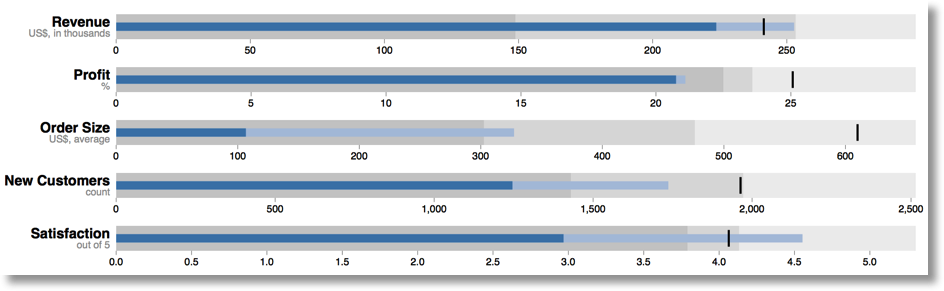
Users often make the mistake of viewing each piece of the front end stack as separate entities, and without proper training this is very understandable. Even though they are separate pieces of the product, they are all meant to work together and enhance the “Business Intelligence” of an organization. Without training the business to complement one piece to another, it will always be viewed as just another frustrating tool that they don’t have enough time to learn on their own. This tool is meant to empower your organization to have everything they need to make the most informed and timely decisions, let us use our experience to enable your business.
BIP Quartz tables
On a 11g BIP only install you can use the QUARTZ scheduler. The scheduler is fed from the XMLP_SCHED_JOB table from the repository. It will seed either the QRTZ_SIMPLE_TRIGGERS (one off jobs) or QRTZ_CRON_TRIGGERS (repeating jobs). This will feed the QRTZ_TRIGGERS table which controls the next execution time. The actual job is in the QRTZ_JOB_DETAILS table.
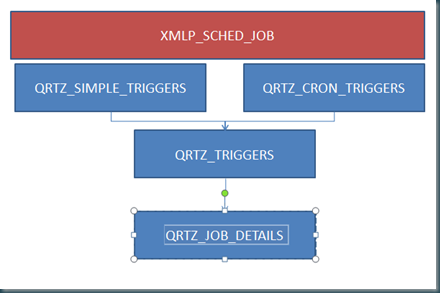
You can inject jobs directly into these tables. Remember that all DateTimes are in QUARTZ_TICKS calculated back to GMT time. A ms-sql conversion function DateTime to Ticks can be foud here. From Ticks to DateTime is this one.
Till Next Time
BIP11g Users and Roles
Did some work on a 11g BI publisher only install recently. Opposite to OBIEE11g you can still add users directly into BIP. Be sure to give them the right roles and sync it with your weblogic security realm.
Till Next Time
Event Triggers in BI Publisher 11g
Event Triggers in BI Publisher 11g give the facility to call a function in Oracle either before or after a data set is refreshed. The function must return a boolean (true/false), and if it returns false the data model will abort execution.
In this article I will demonstrate how to pass a parameter through to a function in the database, and write this parameter to a table in the database. This could be useful for auditing the use of the system. The parameter that I will use is a system variable, User locale, that can be accessed through the BI Publisher System Variable :xdo_user_report_locale. There are several others available (see list here), and you can also reference your own parameters that you define in the dataset.
In this very simple example, we will write an entry to an audit table every time the data set is refreshed. The table we will use is defined as follows:
--Create table
CREATE  TABLE bip_audit_log  (action_desc VARCHAR(255), action_ts DATE);
The interface between the BI Publisher Event Trigger, and writing to the Database table, is a custom PL/SQL package. You can write your own depending on what you want to achieve with the Event Trigger. If you use parameters, then make sure they are declared globally (and see the note below about matching up parameter names, if you are trying to use parameters defined within the data model).
Here is the example package:
-- This is the package declaration.
-- The global variable is essential if you want to pass parameters in.
CREATE OR REPLACE PACKAGE bip_audit AS
g_input varchar2(255);
FUNCTION beforeDatasetRefreshWithInput(g_input IN VARCHAR2)
  RETURN BOOLEAN;
END;
/
-- This is the package body - the function
CREATE OR REPLACE PACKAGE body bip_audit AS
FUNCTION beforeDatasetRefreshWithInput(g_input IN VARCHAR2)
  RETURN BOOLEAN AS
BEGIN
  INSERT  INTO bip_audit_log
    (
      action_desc,
      action_ts
    )
    VALUES
    (
      'Locale : '
      || g_input,
      sysdate
    );
  COMMIT;
  RETURN TRUE;
EXCEPTION
WHEN OTHERS THEN
  RETURN false;
END;
END;
/
Before you use your package, you should test it:
-- test function
-- Use this to invoke the function
DECLARE
  result BOOLEAN;
BEGIN
  result := bip_audit.beforedatasetrefreshwithinput('foobar');
END;
/
-- Now select from the table, and make sure we got an entry
SELECT action_desc,         TO_CHAR(action_ts,'YYYY-MM-DD HH24:MI:SS')
from bip_audit_log;
/
Once you have created the PL/SQL package, create a New -> Data Model in BI Publisher/OBIEE and go to the Data Model Properties page and set the Oracle DB Default Package to that which you have created. Make sure that the PL/SQL package is accessible from the Default Data Set connection that is defined for your Data Model.
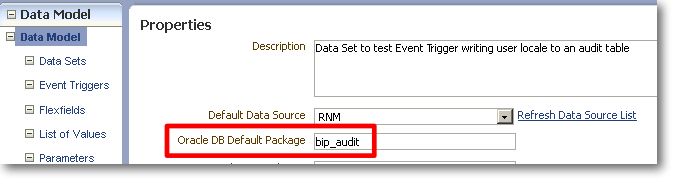
Build your Data Set as required, and save the Data Model.
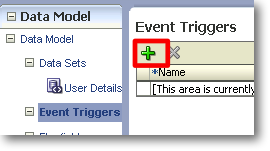
Now go to Event Triggers, and click on Create new Event Trigger.
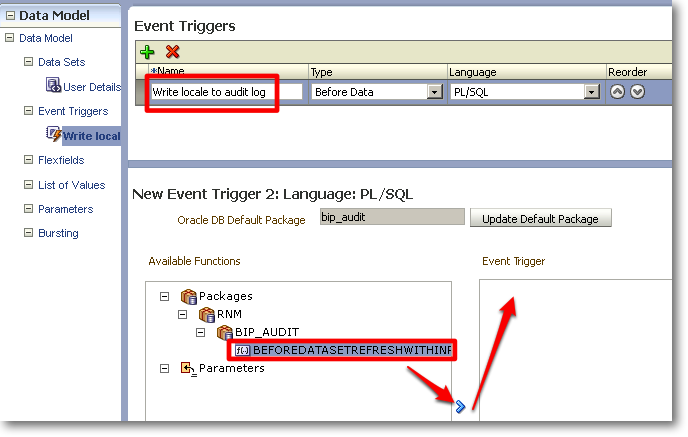
Name the event trigger Write locale to audit log. Set the Type to Before Data, and Language as PL/SQL.
In the lower pane of the window, under Available Functions you should see the name of the package that you set in the Properties page. If you don’t, check that the package exists as defined in Properties, and can be accessed by the user and connection defined as the Default Data Source for the Data Model.
Underneath the package, you should see the function that you defined, listed in upper case. Highlight the function and click the right arrow to move it into the Event Trigger box on the right.
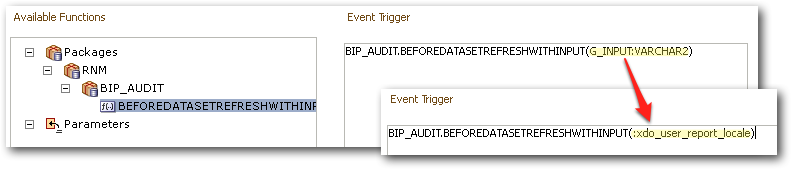
Now manually edit the Event Trigger text to replace the part in brackets:
G_INPUT:VARCHAR2
with
:xdo_user_report_locale
(note the colon prefix)
Save the changes to your data model, and then click on view XML, and click Run.
When you clicked Run, the Event Trigger should have fired, and you’ll see the results of the Data Set as normal. To confirm the success of the Event Trigger, check the contents of the audit table:
SELECT action_desc, TO_CHAR(action_ts,'YYYY-MM-DD HH24:MI:SS') from bip_audit_log;
Result:
ACTION_DESC          TO_CHAR(ACTION_TS,'
-------------------- -------------------
Locale : en_US       2011-12-01 16:26:56
This completes the simple example, having shown how to pass a parameter through to a function via an Event Trigger. However, read on below to see details of the problems you may expect to encounter deviating from the very narrow example above.
Gotcha!
The above works fine, unless you add your own parameter to the dataset (regardless of whether you try to use it in the event trigger).
If you try to use the above Event Trigger, in a Data Model in which a Parameter exists, you’ll get this error:
PLS-00302: component 'NEW_PARAMETER_2' must be declared
ORA-06550: line 2, column 1:
PL/SQL: Statement ignored
(where New_Parameter_2 is the name of the parameter that exists in the data set).
I would imagine that the workaround for this would be to amend the package function to also accept the parameter names also defined in the report, even if they’re not used by the function.
Using your own parameters
If you want to use your own parameter (rather than a system variable as above), then from my testing it appears that the issue described here in 2007 (MOS DocID 859980.1) still holds: your Data Set parameter name must match the name of a global parameter defined in your package function.
So in the above example, a parameter defined in the data set as g_input would work as input to the Event Trigger :
BIP_AUDIT.BEFOREDATASETREFRESHWITHINPUT(:g_input)
But changing the parameter name in the Data Set, and its corresponding reference in the Event Trigger, would not:
BIP_AUDIT.BEFOREDATASETREFRESHWITHINPUT(:my_new_parm_name)
This throws the error :
Message	oracle.xdo.XDOException: oracle.xdo.XDOException: oracle.xdo.XDOException: java.sql.SQLException: ORA-06550: line 2, column 11:
Supplemental Detail	PLS-00302: component 'MY_NEW_PARM_NAME' must be declared
ORA-06550: line 2, column 1:
PL/SQL: Statement ignored
Why this doesn’t apply to passing through system variables (for example, xdo_user_report_locale seen above), I don’t know.
Troubleshooting
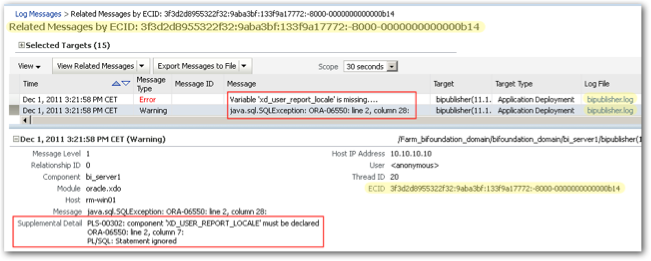
Watch out for unhelpful error handling within BI Publisher. If there’s a problem with the XML generation (for example - but not limited to - the Event Trigger call being incorrect), expect to get this kind of thing:
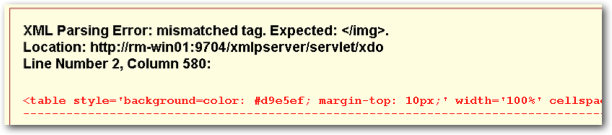
XML Parsing Error: mismatched tag. Expected: </img>.
Location: http://rm-win01:9704/xmlpserver/servlet/xdo
Line Number 2, Column 580:<table style='background=c[...]
The annoying thing about this is that the actual error is tantalisingly close - if you scroll to the end of the line, you’ll see that it truncates:
oracle.xdo.XDOException: java.sql.SQLException: ORA-06550: line 4, column 51:
So to find out the actual error, go to Enterprise Manager (FMC) and under your Web Logic Domain, navigate to your bi_server and right-click, Logs -> View Logs
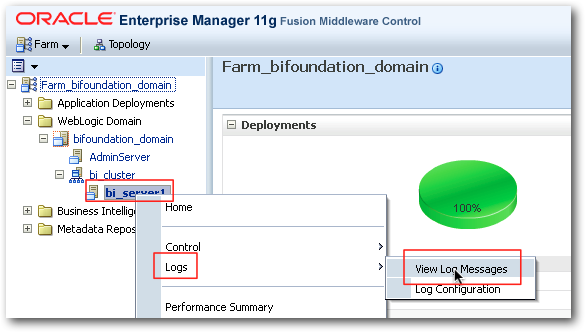
Within here you should find the error, and by taking advantage of the ECID (Execution Context ID), you can drill through to related log entries. In this instance, that includes both the error at the BI Publisher level and that reported back from the database.
Version
The above was all tested on BI Publisher 11.1.1.5.
Documentation
Event Triggers are covered in the documentation here
OBIEE11g / BIP Quartz Scheduler
Seems that Oracle is using there own standard for the Date Time format in the BIP quartz scheduler. They are not using standard ticks (starting on 1-jan-0001) but a milliseconds count starting on 1-jan-1970. So 1-Jan-2012 = 1325376000000. IE: a whole day is 86400000 ticks.
Till Next Time
 Specialist in liberating data into valuable information for the business.
  The technical engineers who know all about Oracle BI architectures
  The implementation partner for Exadata and Exalytics