
Tag Archives: Security
10 Best Practices to Secure PostgreSQL AWS RDS/Aurora
AWS supports PostgreSQL versions 9.4 through 12 on RDS and 9.6 through 11 on Aurora. Many organizations are migrating to PostgreSQL RDS or Aurora in order to take advantage of availability, scalability, performance, etc. and are doing it as either a heterogeneous or a homogeneous migration.
Security and Compliance is a shared responsibility between AWS and the customer:
- AWS is responsible for security “OF” the cloud
- Customer is responsible for security “IN” the cloud.
When it comes to dealing with data in the cloud, security is a key aspect. Data breaches or data privacy is not surprising topics in today’s world, in the first six months of 2019 alone 4.1 billion records were exposed in data breaches. When thinking of securing PostgreSQL RDS or Aurora in AWS, below are the top 10 points that come to mind as a priority. Let’s go walk through them one at a time.
1. DB Subnet Group with Private Subnets:
DB Subnet group is mandatory configuration while creating RDS and each DB subnet group should have subnets in at least two Availability Zones in each AWS Region. Make sure these subnets are private until there is an explicit need of accessing RDS database from the public network based on use-case.
Quick validation way is:
- Internet gateway is not associated with VPC/subnets/routes.
- Public IP is not assigned to RDS instances.
2. Managing Security Groups:
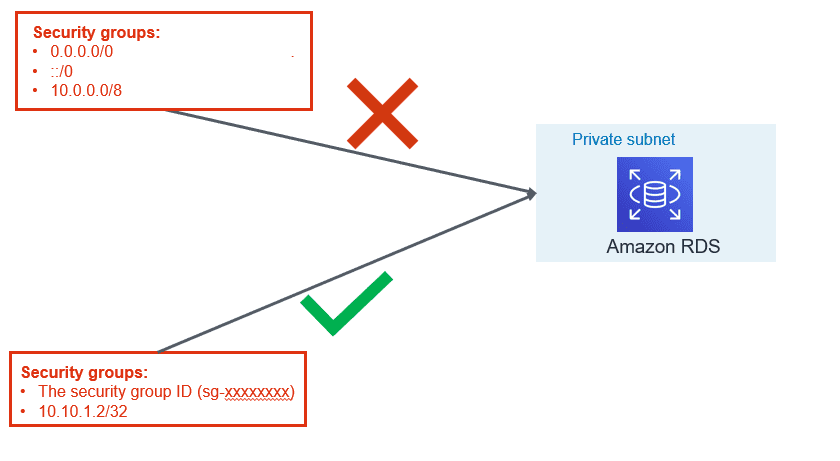
VPC security group are like firewall at the subnet level which controls access to DB instances in VPC. It plays a significant part in managing who all can access RDS instance.
- Use application servers’ security group names instead of an individual IP addresses or range of IP addresses. This will allow inbound traffic ONLY from network interfaces (and their associated
- instances) that are assigned to that security group.
- If there is a specific need for giving access for a specific server, include only that IP in the security group instead of range of that IP.
- Avoid giving access for desktop, it is recommended that Baston server is used for RDS access. Tools like PSQL client or pgAdmin should be installed on bastion hosts for Administrative needs for the database administrators.
- Within PostgreSQL it is best practice to use least privileged defined roles for specific purpose (i.e. read role, data modification role, monitoring role, etc.)
3. Use IAM Database Authentication:
AWS RDS and Aurora support authentication to the database using IAM user or role credential. IAM authentication is secure than the traditional method of authentication because:
- No need to generate a password while creating a database user.
- SSL is must while using IAM authentication and that make sure in-transit data is encrypted
- Automatic rotation of token since the token is valid only for 15 minutes
Please refer to our blog “AWS IAM to Authenticate Against RDS Instances & Aurora Clusters” for more information.
4. Enable Encryption and Force SSL:
While Data breaches and Cybersecurity breaches a growing concern, using cloud native encryption options can be savior. AWS provides various options to encrypt data at rest and in-transit.
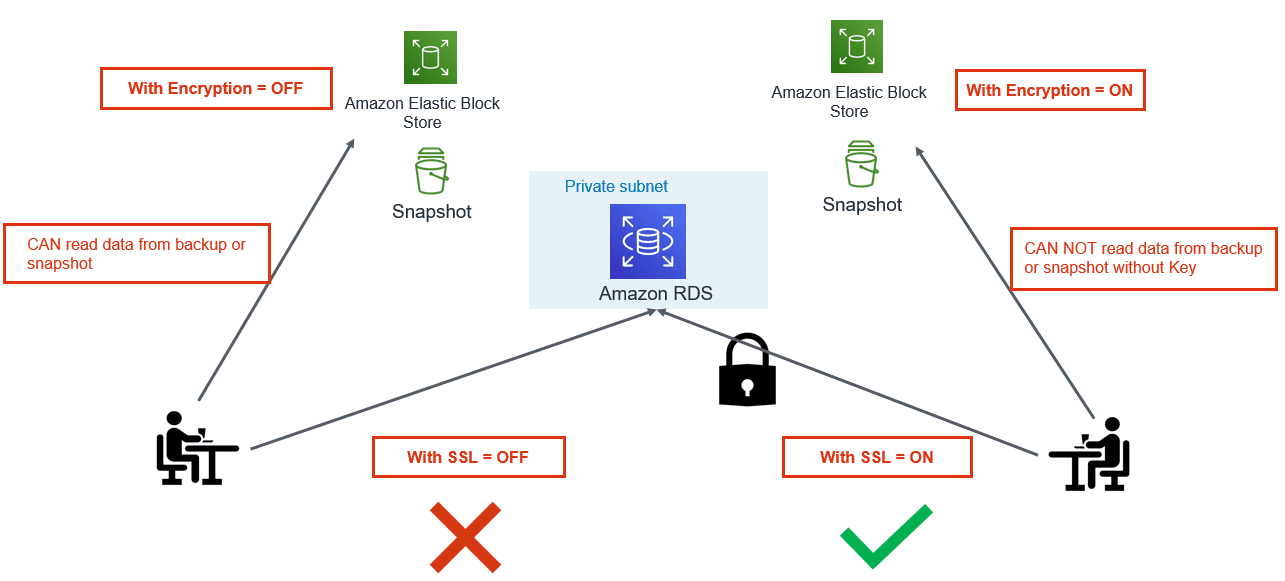
- Encryption at Rest: Use AWS KMS to encrypt RDS and Aurora databases. Once the database is configured with encryption, data stored in the storage layer gets encrypted. Automated-backups, read-replicas and snapshots also get encrypted if you are using encrypted storage.
- Encryption in Transit: PostgreSQL natively supports SSL connections to encrypt client-server communications. Check the DB instance configuration for the value of the force_ssl parameter. By default, the rds.force_ssl parameter is set to 0 (off). If the rds.force_ssl parameter is set to 1, clients are required to use SSL/TLS for connections. If you are using pgBouncer, you can use various authentication methods including TLS/SSL client certificate authentication.
5. Export PostgreSQL Logs to CloudWatch:
You can now publish your Amazon RDS for PostgreSQL logs to CloudWatch Logs. Supported logs include both upgrade logs and PostgreSQL logs. Publishing these logs to CloudWatch allows you to maintain continuous visibility into database errors and activity.
- A database administrator can set up CloudWatch alarms to notify them of frequent restarts, failed login attempts that are recorded in the error log.
- One can create alarms for errors or warnings recorded in PostgreSQL logs. These logs can be stored in to S3 bucket for longer retention.
6. Enable Auditing:
- PostgreSQL Aurora supports Database Activity Streams and pgAduit extension.
- Database activity streams can be integrated with monitoring tools for real time monitoring and notifications.
- This can help in identifying unwanted occurrences and take corrective action as soon as such occurrences are identified.
- These features can help you to meet compliance and regulatory requirements.
7. Timely Patching:
If the database can sustain outage for a few minutes during the maintenance window, you should enable automatic patching of PostgreSQL minor release. If database cannot afford outage, in that case, plan for the scheduled outage but make sure minor patches are applied regularly.
- Major releases usually bring new functionalities and features
- Minor releases fix frequently encountered bugs, security issues, and data corruption problems to reduce the security risk.
Make sure you keep a tab on the latest venerability announced by various organizations.
8. Enable Deletion Protection:
- If delete protection is enabled and you tried deleting the RDS instance, your request will fail. To continue with your request, you need to first modify the instance and disable deletion protection. This configuration is a helpful if this delete request is accidental.
- If you are using tools like Terraform or CloudFormation to support infrastructure as code and automation. You can configure respective flags to enable delete protection.
- For the production environment, it is highly recommended to enable this flag.
9. Use Database Endpoints:
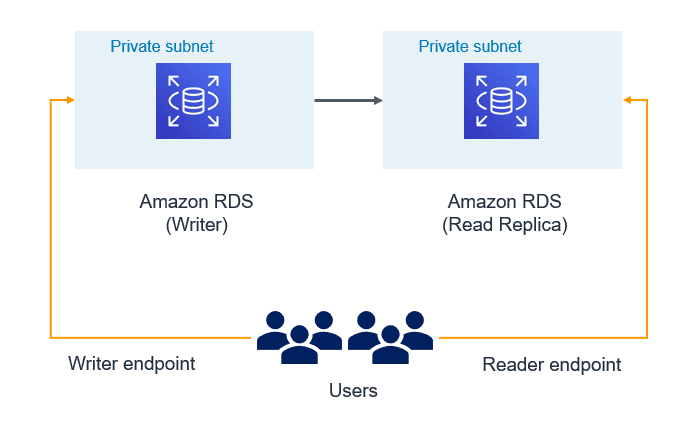
- If read replica is configured and application is intended for read-only workload then make sure reader endpoint is used at application configuration. This would make sure data modifications (DML) don’t get performed by the unintended or accidental operations.
- Use writer/cluster endpoint only for those applications which need data modifications. If there is need, you may even create custom endpoint for specific application or use case.
10. Use custom port:
- By default, Oracle listens on 1521, SQL Server on 1433, and MySQL on 3306. In a similar way PostgreSQL by default gets configured with 5432 TCPIP port. Historically as part of security best practice, it has been recommended not to use the default ports for connections to any DB Server.
- Automated attacks are configured to try finding services running on default ports and you can be lucky if your DB services are running on a non-default port. AWS RDS/Aurora allows you to configure the database with a non-default port.
- Many organizations have the enterprise-level practice to use non-default ports as security guidelines. If your organization is using Cloud formation or Terraform, modifying default port can be an easy way to standardize on those templates.
AWS provides various features and integration to harden security along with auditing and real time monitoring of PostgreSQL RDS/Aurora.
Following the best security practices discussed allows only authorized users and applications have access to the database. If you have inquiries or need assistance on analyzing PostgreSQL RDS/Aurora clusters from a security perspective, contact us. Datavail provides 24x7 support for your database environments.
The post 10 Best Practices to Secure PostgreSQL AWS RDS/Aurora appeared first on Datavail.
Source Control and Automated Code Deployment Options for OBIEE
It's Monday morning. I've arrived at a customer site to help them - ironically enough - with automating their OBIEE code management. But, on arrival, I'm told that the OBIEE team can't meet with me because someone did a release on the previous Friday, had now gone on holiday - and the wrong code was released but they didn't know which version. All hands-on-deck, panic-stations!
This actually happened to me, and in recent months too. In this kind of situation hindsight gives us 20:20 vision, and of course there shouldn't be a single point of failure, of course code should be under version control, of course it should be automated to reduce the risk of problems during deployments. But in practice, these things often don't get done - and it's understandable why. In the very early days of a project, it will be a manual process because that's what is necessary as people get used to the tools and technology. As time goes by, project deadlines come up, and tasks like this are seen as "zero sum" - sure we can automate it, but we can also continue doing it manually and things will still get done, code will still get released. After a while, it's just accepted as how things are done. In effect, it is technical debt - and this is your reminder that debt has to be paid, sooner or later :)
I'll not pretend that managing OBIEE code in source control, and automating code deployments, is straightforward. But, it is necessary, so in this post I'll walk through why you should be doing it, and then importantly how.
Why Source Control?
Do we really need source control for OBIEE? After all, what's wrong with the tried-and-tested method of sticking it all in a folder like this?
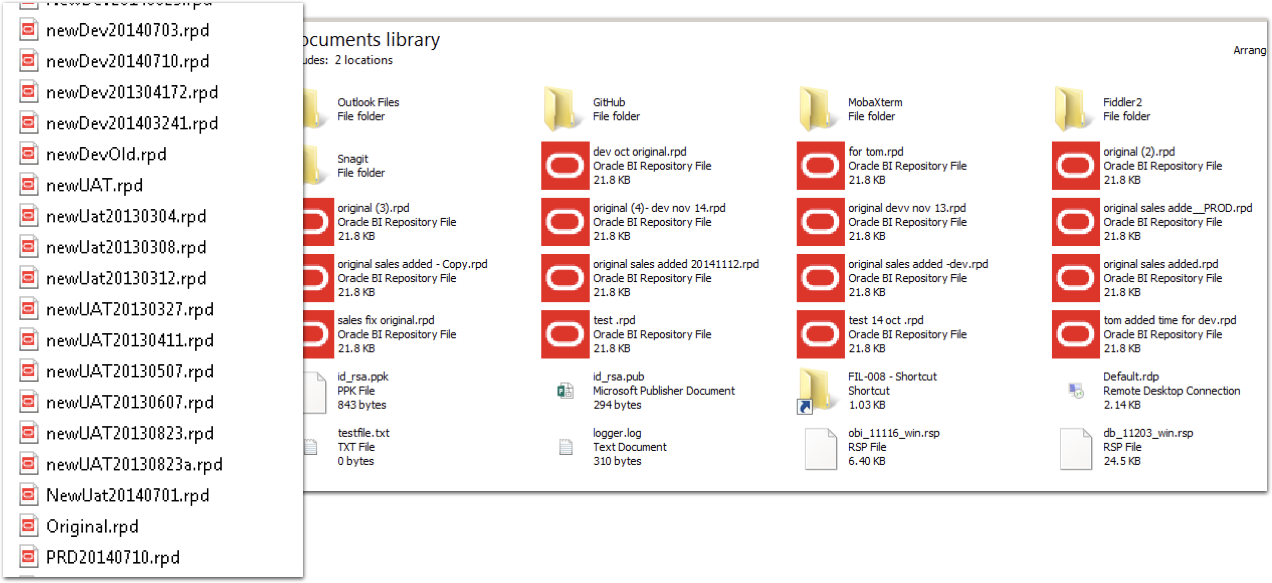
What's wrong with this? What's right with this? Oh lack of source control, let me count the number of ways that I doth hate thee:
- No audit trail of who changed something
- No audit of what was changed, and when
- No enforceable naming standards for versions
- No secure way of identifying deployment candidates
- No distributed method for sharing code (don't tell me that a network share counts!)
- No way of reliably identifying the latest version of code
These range from the immediately practical through to the slightly more abstract but necessary in a mature deployment.
Of immediate impact is the simply ability to identify the latest version of code on which to make new changes. Download the copy from the live server? Really? No. If you're tracking your versions accurately and reliably then you simply pull the latest version of code from there, in the knowledge that it is the version that is live. No monkeying around trying to figure out if it really is (just because it's called "PROD-091216.rpd" how do you know that's actually what got released to Production? And was that on 12th December or 9th September? Who knows!).
Longer term, having a secure and auditable code line simply makes it easier and less risky to manage. It also gives you the ability to work with it in a much more flexible manner, such as genuine concurrent development by multiple developers against the RPD. You can read more about this in my presentation here.
Which Source Control?
I don't care. Not really. So long as you are using source control, I am happy.
For preference, I always advocate using git. It is a modern platform, with strong support from many desktop clients (SourceTree is my favourite, along with the commandline too, natch). Git is decentralised, meaning that you can commit and branch code locally on your own machine without having to be connected to a server. It supports a powerful fork and pull process too, which is part of the reason it has almost universal usage within the open source world. The most well known of git platforms is github, which in effect provides git as a Platform-as-a-service (PaaS), in a similar fashion to Bitbucket too. You can also run git on its own locally, or more pragmatically, with gitlab.
But if you're using Subversion (SVN), Perforce, or whatever - that's fine. The key thing is that you understand how to use it, and that it is supported within your organisation. For simple source control, pretty much all the common platforms work just fine. If you get onto more advanced use, such as feature-branches and concurrent development, you may find it worth ensuring that your chosen platform supports the workflow that you adopt. Even then, whilst I'd chose git for preference, at Rittman Mead we've helped clients develop very powerful concurrent development processes with Subversion providing the underlying source control.
What Goes into Source Control? Part 1
So you've drunk the Source Control koolaid, and accepted that really there is no excuse not to use it. So what do you put into it? The RPD? The OBIEE 12c BAR file? What if you're still on OBIEE 11g? The answer here depends partially on how you are planning to manage code deployment in your environment. For a fully automated solution, you may opt to store code in a more granular fashion than if you are simply migrating full BAR files each time. So, read on to understand about code deployment, and then we'll revisit this question again after that.
How Do You Deploy Code Changes in OBIEE?
The core code artefacts are the same between OBIEE 11g and OBIEE 12c, so I'll cover both in this article, pointing out as we go any differences.
The biggest difference with OBIEE 12c is the concept of the "Service Instance", in which the pieces for the "analytical application" are clearly defined and made portable. These components are:
- Metadata model (RPD)
- Presentation Catalog ("WebCat"), holding all analysis and dashboard definitions
- Security - Application Roles and Policy grants, as well as OBIEE front-end privilege grants
Part of this is laying the foundations for what has been termed "Pluggable BI", in which 'applications' can be deployed with customisations layered on top of them. In the current (December 2016) version of OBIEE 12c we have just the Single Service Instance (ssi). Service Instances can be exported and imported to BI Archive files, known as BAR files.
The documentation for OBIEE environment migrations (known as "T2P" - Test to Production) in 12c is here. Hopefully I won't be thought too rude for saying that there is scope for expanding on it, clarifying a few points - and perhaps making more of the somewhat innocuous remark partway down the page:
PROD Service Instance metadata will be replaced with TEST metadata.
Hands up who reads the manual fully before using a product? Hands up who is going to get a shock when they destroy their Production presentation catalog after importing a service instance?...
Let's take walk through the three main code artefacts, and how to manage each one, starting with the RPD.
The RPD
The complication of deployments of the RPD is that the RPD differs between environments because of different connection pool details, and occassionally repository variable values too.
If you are not changing connection pool passwords between environments, or if you are changing anything else in your RPD (e.g. making actual model changes) between environments, then you probably shouldn't be. It's a security risk to not have different passwords, and it's bad software development practice to make code changes other than in your development environment. Perhaps you've valid reasons for doing it... perhaps not. But bear in mind that many test processes and validations are based on the premise that code will not change after being moved out of dev.
With OBIEE 12c, there are two options for managing deployment of the RPD:
- BAR file deploy and then connection pool update
- Offline RPD patch with connection pool updates, and then deploy
- This approach is valid for OBIEE 11g too
RPD Deployment in OBIEE 12c - Option 1
This is based on the service instance / BAR concept. It is therefore only valid for OBIEE 12c.
- One-off setup : Using
listconnectionpoolto create a JSON connection pool configuration file per target environment. Store each of these files in source control. Once code is ready for promotion from Development, run
exportServiceInstanceto create a BAR file. Commit this BAR file to source control/app/oracle/biee/oracle_common/common/bin/wlst.sh <<EOF exportServiceInstance('/app/oracle/biee/user_projects/domains/bi/','ssi','/home/oracle','/home/oracle') EOF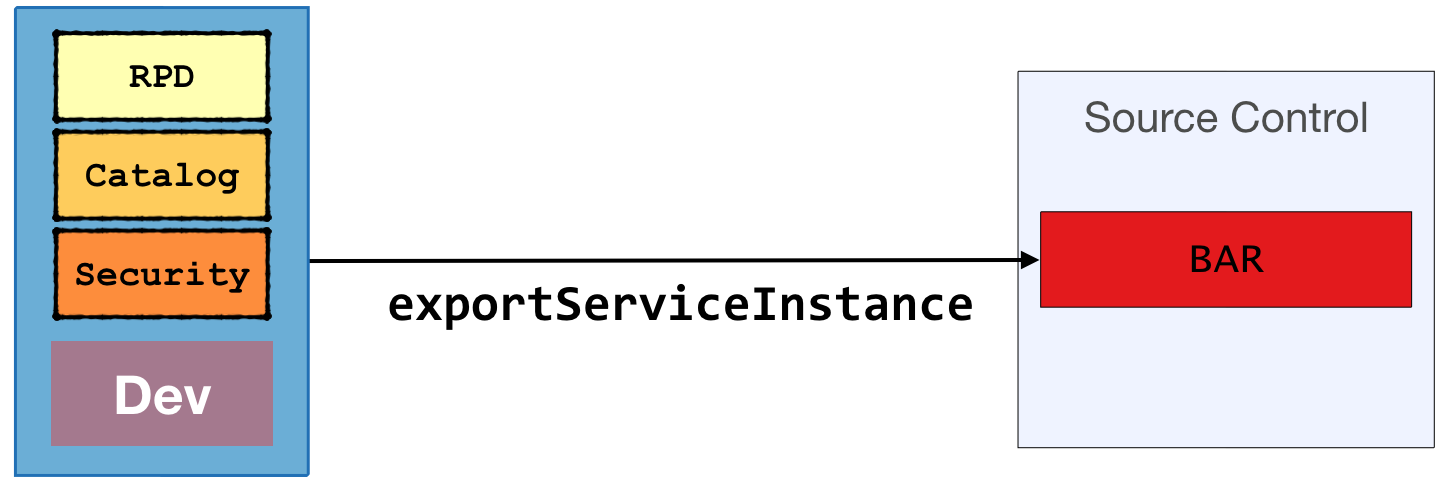
To deploy the updated code to the target environment:
- Checkout the BAR from source control
Deploy it with
importServiceInstance, ensuring that theimportRPDflag is set./app/oracle/biee/oracle_common/common/bin/wlst.sh <<EOF importServiceInstance('/app/oracle/biee/user_projects/domains/bi','ssi','/home/oracle/ssi.bar',true,false,false) EOFRun
updateConnectionPoolusing the configuration file from source control for the target environment to set the connection pool credentials/app/oracle/biee/user_projects/domains/bi/bitools/bin/datamodel.sh updateconnectionpool -C ~/prod_cp.json -U weblogic -P Admin123 -SI ssi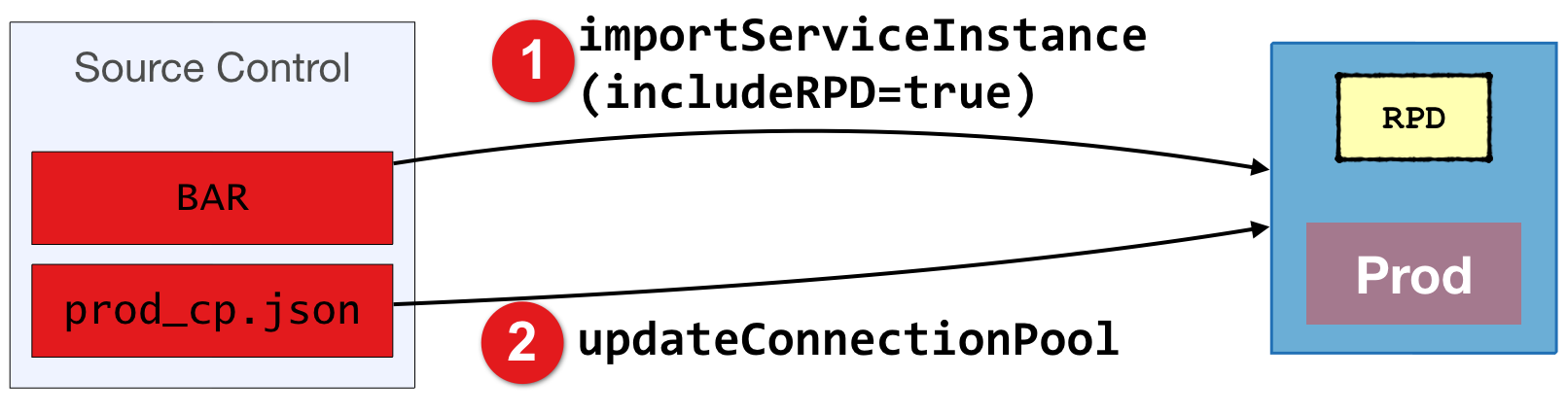
Note that your OBIEE system will not be able to connect to source databases to retrieve data until you update the connection pools.
The BI Server should pick up the new RPD after a few minutes. You can force this by restarting the BI Server, or using "Reload Metadata" from OBIEE front end.
Whilst you can also create the BAR file with includeCredentials, you wouldn't use this for migration of code between environments - because you don't have the same connection pool database passwords in each environment. If you do have the same passwords then change it now - this is a big security risk.
The above BAR approach works fine, but be aware that if the deployed RPD is activated on the BI Server before you have updated the connection pools (step 3 above) then the BI Server will not be able to connect to the data sources and your end users will see an error. This approach is also based on storing the BAR file as whole in source control, when for preference we'd store the RPD as a standalone binary if we want to be able to do concurrent development with it.
RPD Deployment in OBIEE 12c - Option 2 (also valid for OBIEE 11g)
This approach takes the RPD on its own, and takes advantage of OBIEE's patching capabilities to prepare RPDs for the target environment prior to deployment.
One-off setup: create a XUDML patch file for each target environment.
Do this by:
- Take your development RPD (e.g. "DEV.rpd"), and clone it (e.g. "PROD.rpd")
- Open the cloned RPD (e.g. "PROD.rpd") offline in the Administration Tool. Update it only for the target environment - nothing else. This should be all connection pool passwords, and could also include connection pool DSNs and/or users, depending on how your data sources are configured. Save the RPD.
Using
comparerpd, create a XUDML patch file for your target environment:/app/oracle/biee/user_projects/domains/bi/bitools/bin/comparerpd.sh \ -P Admin123 \ -W Admin123 \ -G ~/DEV.rpd \ -C ~/PROD.rpd \ -D ~/prod_cp.xudmlRepeat the above process for each target environment
Once code is ready for promotion from Development:
Extract the RPD
In OBIEE 12c use
downloadrpdto obtain the RPD file/app/oracle/biee/user_projects/domains/bi/bitools/bin/datamodel.sh \ downloadrpd \ -O /home/oracle/obiee.rpd \ -W Admin123 \ -U weblogic \ -P Admin123 \ -SI ssiIn OBIEE 11g copy the file from the server filesystem
Commit the RPD to source control
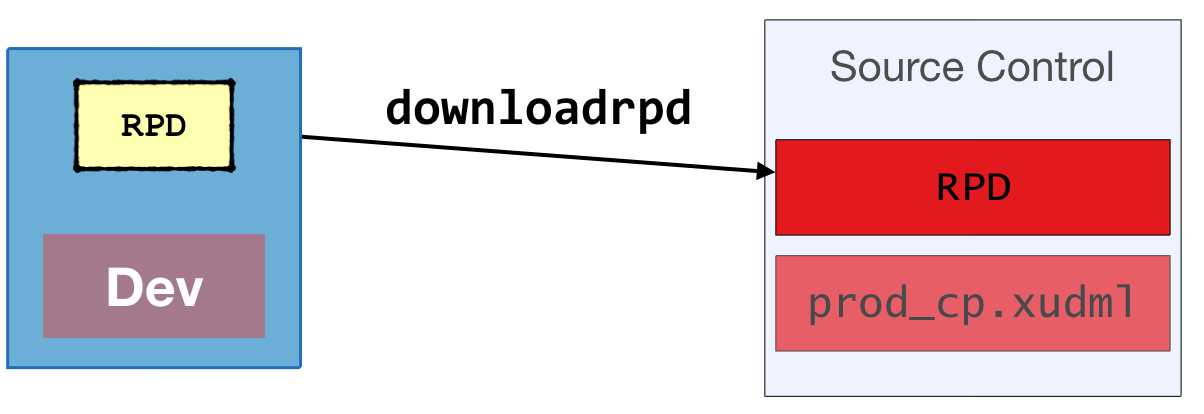
To deploy the updated code to the target environment:
- Checkout the RPD from source control
Prepare it for the target environment by applying the patch created above
- Check out the XUDML patch file for the appropriate environment from source control
Apply the patch file using
biserverxmlexec:/app/oracle/biee/user_projects/domains/bi/bitools/bin/biserverxmlexec.sh \ -P Admin123 \ -S Admin123 \ -I prod_cp.xudml \ -B obiee.rpd \ -O /tmp/prod.rpd
Deploy the patched RPD file
In OBIEE 12c use
uploadrpd/app/oracle/biee/user_projects/domains/bi/bitools/bin/datamodel.sh \ uploadrpd \ -I /tmp/prod.rpd \ -W Admin123 \ -U weblogic \ -P Admin123 \ -SI ssi \ -DThe RPD is available straightaway. No BI Server restart is needed.
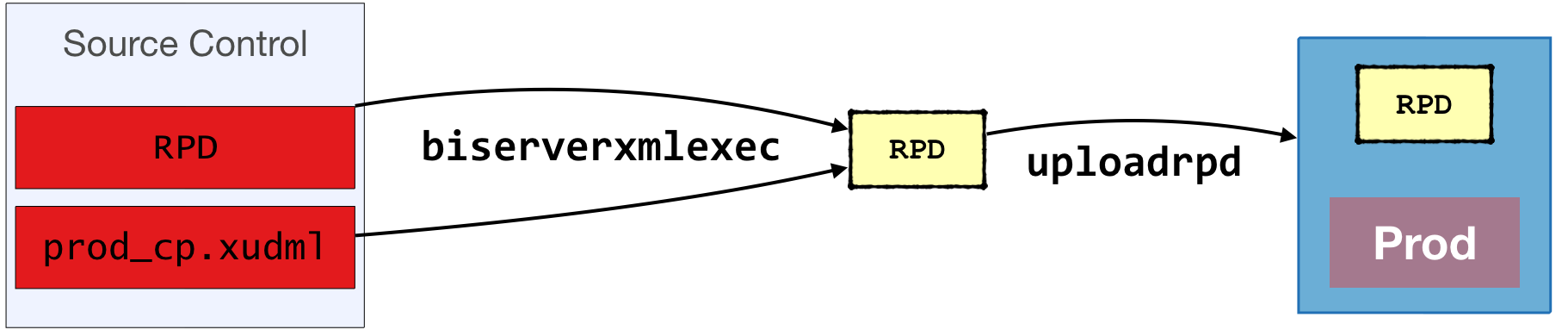
In OBIEE 11g use WLST's uploadRepository to programatically do this, or manually from EM.
After deploying the RPD in OBIEE 11g, you need to restart the BI Server.
This approach is the best (only) option for OBIEE 11g. For OBIEE 12c I also prefer it as it is 'lighter' than a full BAR, more solid in terms of connection pools (since they're set prior to deployment, not after), and it enables greater flexibility in terms of RPD changes during migration since any RPD change can be encompassed in the patch file.
Note that the OBIEE 12c product manual states that uploadrpd/downloadrpd are for:
"...repository diagnostic and development purposes such as testing, only ... all other repository development and maintenance situations, you should use BAR to utilize BAR's repository upgrade and patching capabilities and benefits.".
Maybe in the future the BAR capabilites will extend beyond what they currently do - but as of now, I've yet to see a definitive reason to use them and not uploadrpd/downloadrpd.
The Presentation Catalog ("WebCat")
The Presentation Catalog stores the definition of all analyses and dashboards in OBIEE, along with supporting objects including Filters, Conditions, and Agents. It differs significantly from the RPD when it comes to environment migrations. The RPD can be seen in more traditional software development lifecycle terms, sine it is built and developed in Development, and when deployed in subsequent environment overwrites in entirety what is currently there. However, the Presentation Catalog is not so simple.
Commonly, content in the Presentation Catalog is created by developers as part of 'pre-canned' reporting and dashboard packs, to be released along with the RPD to end-users. Where things get difficult is that the Presentation Catalog is also written to in Production. This can include:
- User-developed content saved in one (or both) of:
- My Folders
- Shared, e.g. special subfolders per department for sharing common reports outside of "gold standard" ones
- User's profile data, including timezone and language settings, saved dashboard customisations, preferred delivery devices, and more
- System configuration data, such as default formatting for specific columns, bookmarks, etc
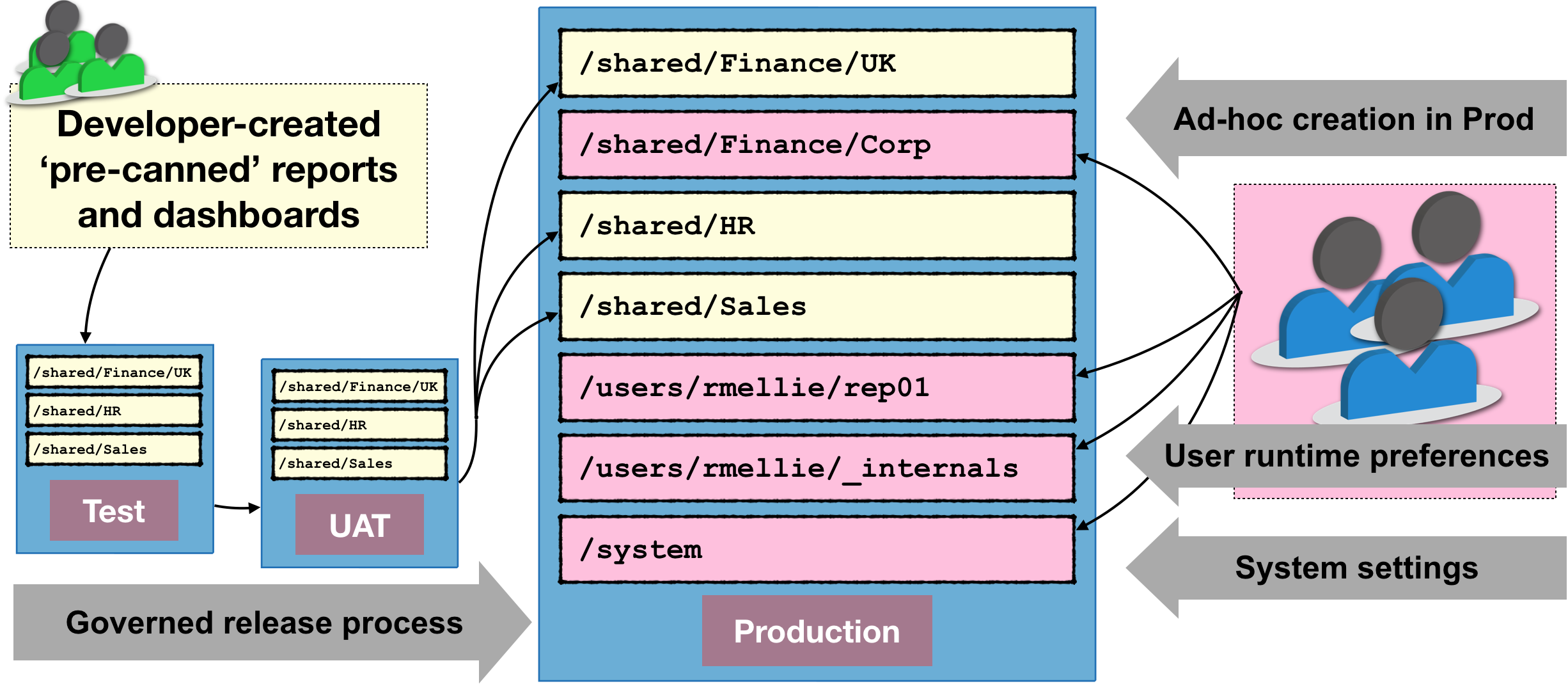
In your environment you maybe don't permit some of these (for example, disabling access to My Folders is not uncommon). But almost certainly, you'll want your users to be able to persist their environment settings between sessions.
The impact of this is that the Presentation Catalog becomes complex to manage. We can't just overwrite the whole catalog when we come to deployment in Production, because if we do so all of the above listed content will get deleted. And that won't make us popular with users, at all.
So how do we bring any kind of mature software development practice to the Presentation Catalog, assuming that we have report development being done in non-Production environments?
We have two possible approaches:
- Deploy the full catalog into Production each time, but backup first existing content that we don't want to lose, and restore it after the deploy
- Fiddly, but means that we don't have to worry about which bits of the catalog go in source control - all of it does. This has consequences for if we want to do branch-based development with source control, in that we can't. This is because the catalog will exist as a single binary (whether
BARor7ZIP), so there'll be no merging with the source control tool possible. - Risky, if we forget to backup the user content first, or something goes wrong in the process
- A 'heavier' operation involving the whole catalog and therefore almost certainly requiring the catalog to be in maintenance-mode (read only).
- Fiddly, but means that we don't have to worry about which bits of the catalog go in source control - all of it does. This has consequences for if we want to do branch-based development with source control, in that we can't. This is because the catalog will exist as a single binary (whether
- Deploy the whole catalog once, and then do all subsequent deploys as deltas (i.e. only what has changed in the source environment)
- Less risky, since not overwriting whole target environment catalog
- More flexible, and more granular so easier to track in source control (and optionally do branch-based development).
- Requires more complex automated deployment process.
Both methods can be used with OBIEE 11g and 12c.
Presentation Catalog Migration in OBIEE - Option 1
In this option, the entire Catalog is deployed, but content that we want to retain backed up first, and then re-instated after the full catalog deploy.
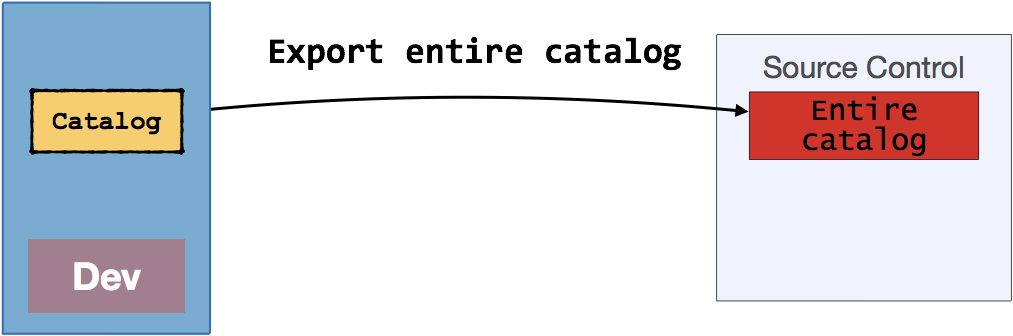
First we take the entire catalog from the source environment and store it in source control. With OBIEE 12c this is done using the exportServiceInstance WLST command (see the example with the RPD above) to create a BAR file. With OBIEE 11g, you would create an archive of the catalog at its root using 7-zip/tar/gzip (but not winzip).
When ready to deploy to the target environment, we first backup the folders that we want to preserve. Which folders might we want to preserve?
/users- this holds both objects that users have created and saved inMy Folders, as well as user profile information (including timezone preferences, delivery profiles, dashboard customisations, and more)/system- this hold system internal settings, which include things such as authorisations for the OBIEE front end (/system/privs), as well as column formatting defaults (/system/metadata), global variables (/system/globalvariables), and bookmarks (/system/bookmarks).
- See note below regarding the
/system/privsfolder
- See note below regarding the
/shared/<…>/<…>- if users are permitted to create content directly in the Shared area of the catalog you will want to preserve this. A valid use of this is for teams to share content developed internally, instead of (or prior to) it being released to the wider user community through a more formal process (the latter being often called 'gold standard' reports).
Regardless of whether we are using OBIEE 11g or 12c we create a backup of the folders identified by using the Archive functionality of OBIEE. This is NOT just creating a .zip file of the file system folders - which is completely unsupported and a bad idea for catalog management, except at the very root level. Instead, the Archive functionality creates a .catalog file which can be stored in source control, and unarchived back into OBIEE to restore content.
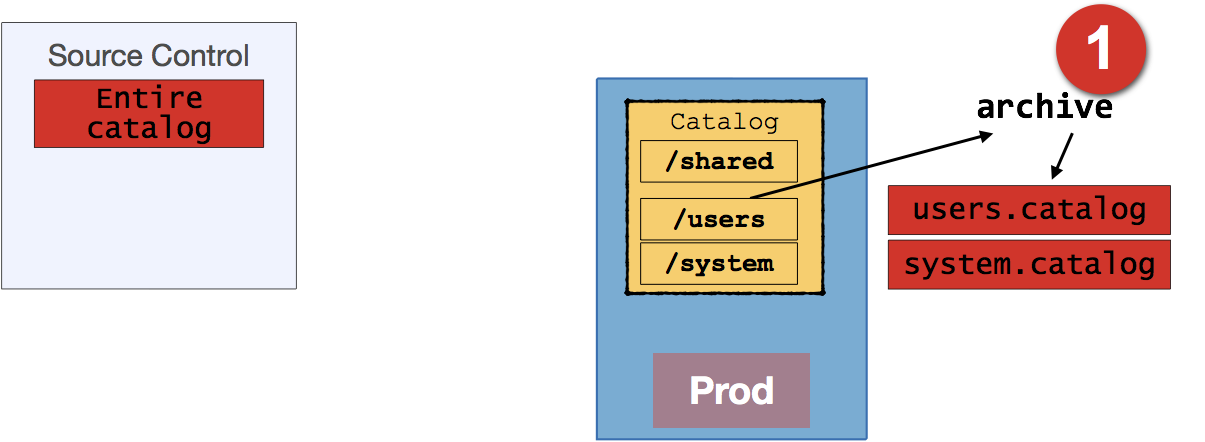
You can create OBIEE catalog archives in one of four ways, which are also valid for importing the content back into OBIEE too:
- Manually, through OBIEE front-end
- Manually, through Catalog Manager GUI
Automatically, through Catalog Manager CLI (
runcat.sh)Archive:
runcat.sh \
-cmd archive  \
-online http://demo.us.oracle.com:7780/analytics/saw.dll \
-credentials /tmp/creds.txt \
-folder "/shared/HR" \
-outputFile /home/oracle/hr.catalog
Unarchive:
runcat.sh \
-cmd unarchive \
-inputFile hr.catalog \
-folder /shared \
-online http://demo.us.oracle.com:7780/analytics/saw.dll  \
-credentials /tmp/creds.txt \
-overwrite all
Automatically, using the
WebCatalogServiceAPI (copyItem2/pasteItem2).
Having taken a copy of the necessary folders, we then deploy the entire catalog (with the changes from the development in) taken from source control. Deployment is done in OBIEE 12c using importServiceInstance. In OBIEE 11g it's done by taking the server offline, and replacing the catalog with the filesystem archive to 7zip of the entire catalog.
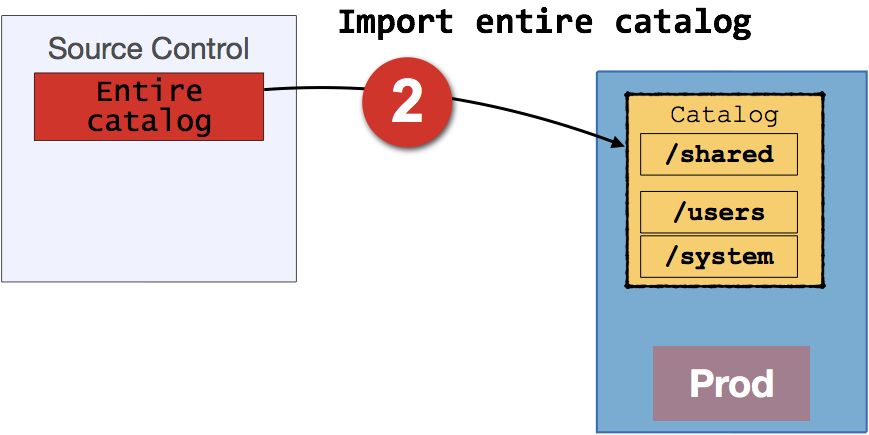
Finally, we then restore the folders previously saved, using the Unarchive function to import the .catalog files:
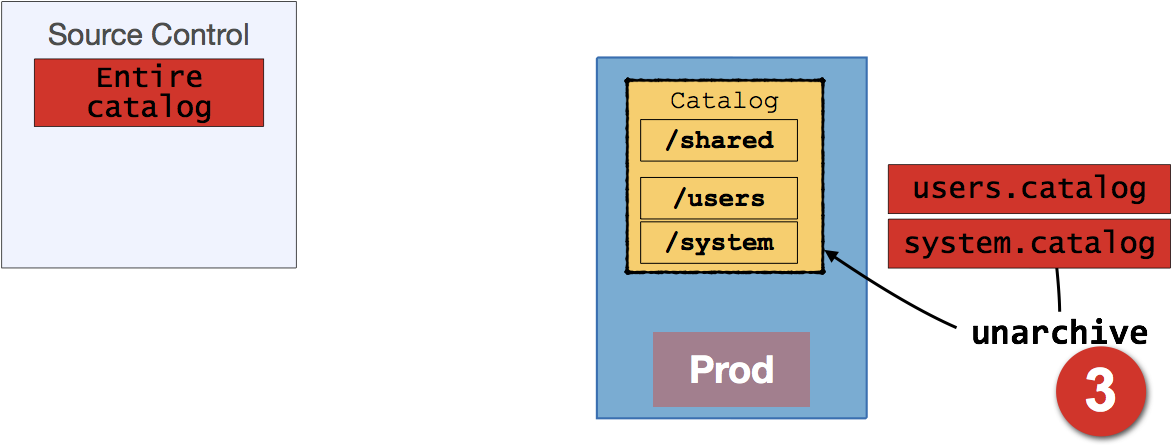
Presentation Catalog Migration in OBIEE - Option 2
In this option we take a more granular approach to catalog migration. The entire catalog from development is only deployed once, and after that only .catalog files from development are put into source control and then deployed to the target environment.
As before, the entire catalog is initially taken from the development environment, and stored in source control. With OBIEE 12c this is done using the exportServiceInstance WLST command (see the example with the RPD above) to create a BAR file. With OBIEE 11g, you would create an archive of the catalog at its root using 7zip.
Note that this is only done once, as the initial 'baseline'.
The first time an environment is commissioned, the baseline is used to populate the catalog, using the same process as in option 1 above (in 12c, importServiceInstance/ in 11g unzip of full catalog filesystem copy).
After this, any work that is done in the catalog in the development environment is migrated through by using OBIEE's archive function against just the necessary /shared subfolder to a .catalog file, storing this in source control
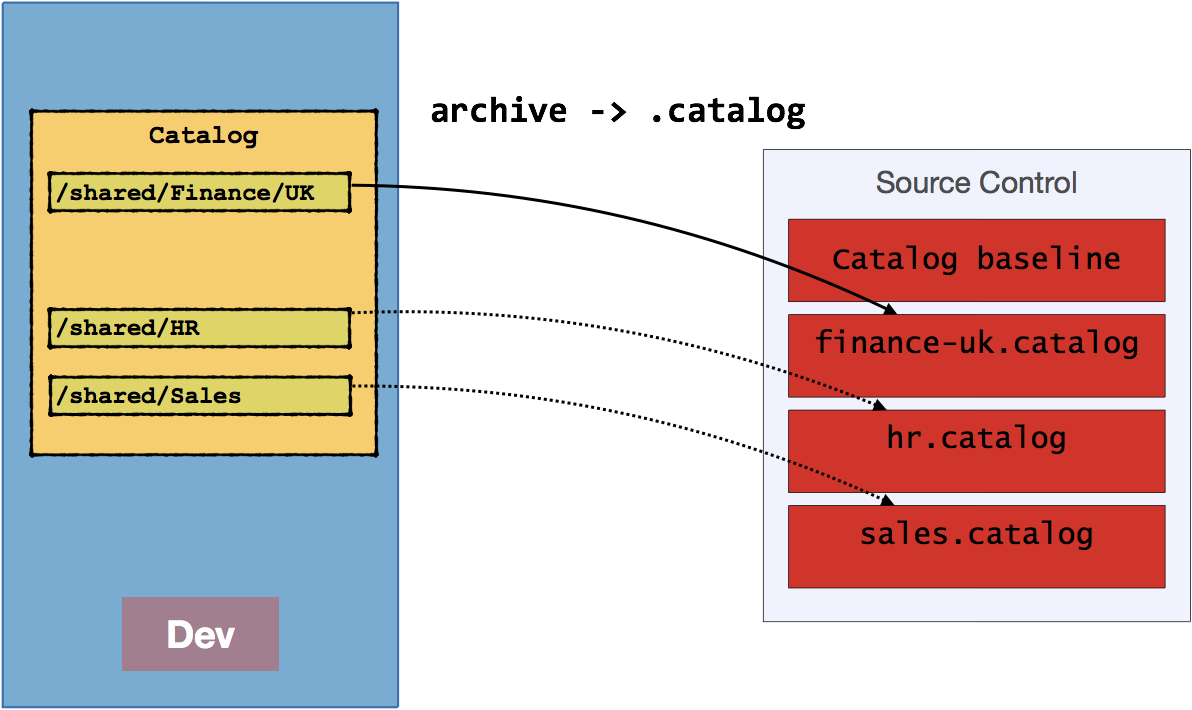
This is then imported to target environment with unarchive capability. See above in option 1 for details of using archive/unarchive - just remember that this is archiving with OBIEE, not using 7zip!
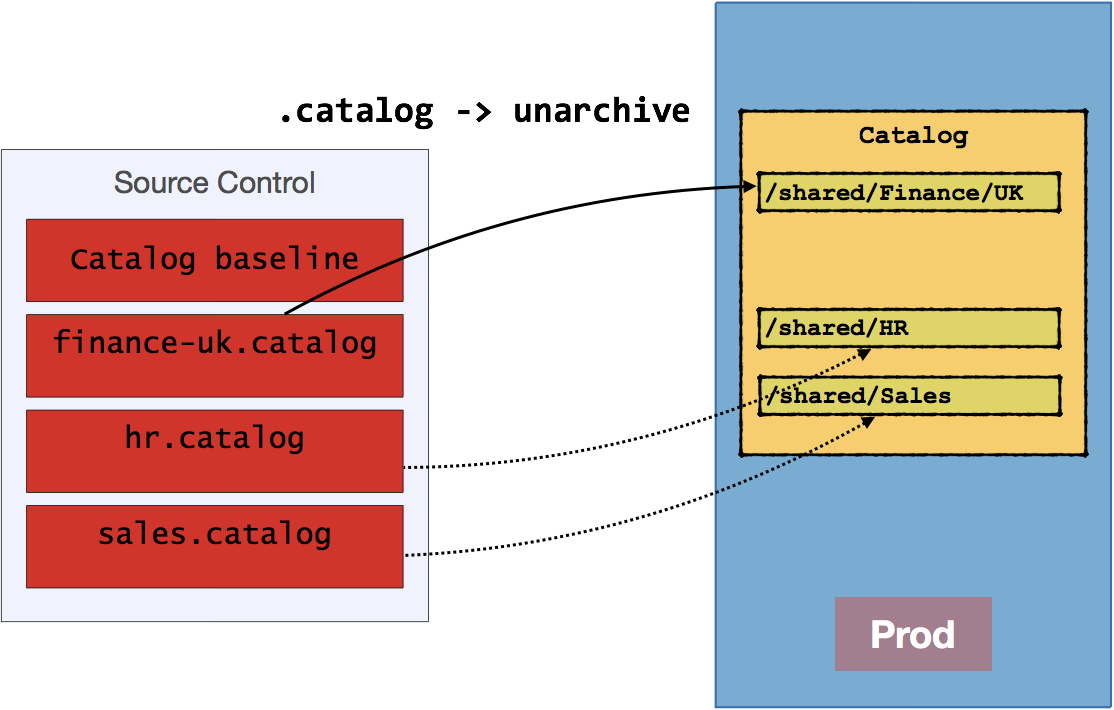
You will need to determine at what level you take this folder: -
- If you archive the whole of
/sharedeach time you'll never be able to do branch-based development with the catalog in which you want to merge branches (because the.catalogfile is binary). - If you instead work at, say, department level (
/shared/HR,/shared/sales, etc) then the highest grain for concurrent catalog development would be the department. The lower down the tree you go the greater the scope for independent concurrent development, but the greater the complexity to manage. This is because you want to be automating the unarchival of these.catalogfiles to the target environment, so having to deal with multiple levels of folder hierarchy gets hard work.
It's a trade off between the number of developers, breadth of development scope, and how simple you want to make the release process.
The benefit of this approach is that content created in Production remains completely untouched. Users can continue to create their content, save their profile settings, and so on.
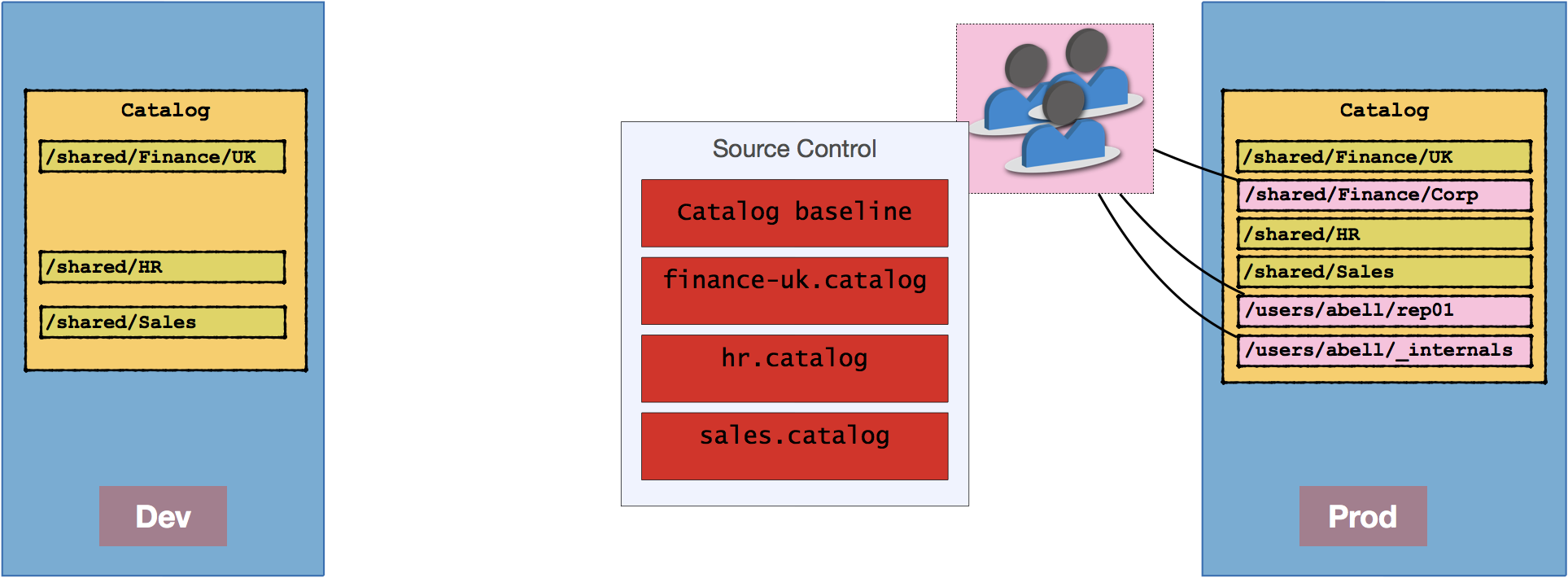
Presentation Catalog Migration - OBIEE Privilege Grants
Permissions set in the OBIEE front end are stored in the Presentation Catalog's /system/privs folder.
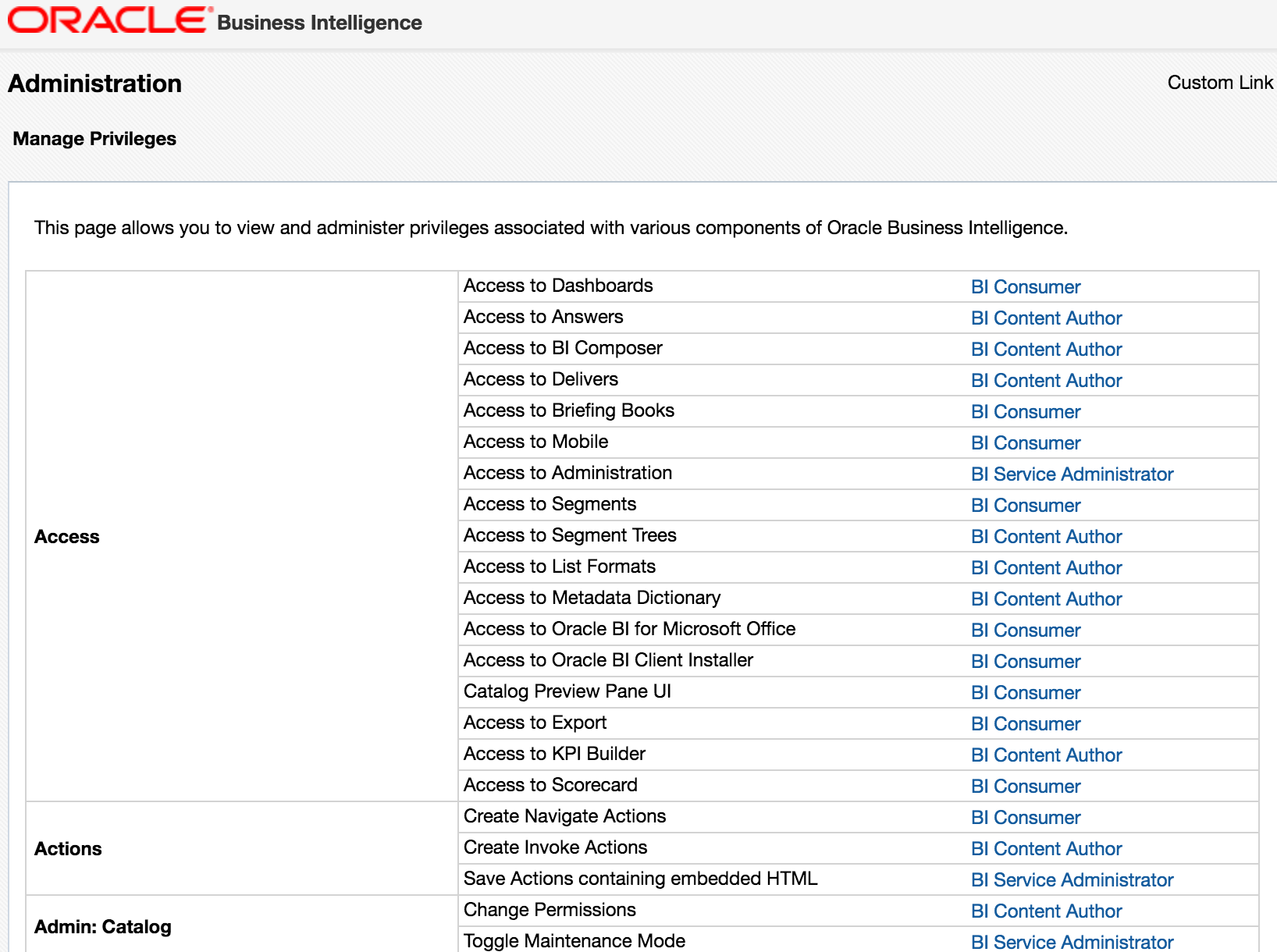
Therefore, how this folder is treated during migration dictates where you must apply your security grants (or conversely, where you set your security grants dictates how you should treat the folder in migrations). For me the "correct" approach would be to define the full set of privileges in the development environment and the migrate these through along with pre-built objects in /shared through to Production. If you have a less formal approach to environments, or for whatever reason permissions are granted directly in Production, you will need to ensure that the /system/privs folder isn't overwritten during catalog deployments.
When you create a BAR file in OBIEE 12c, it does include /system/privs (and /system/metadata). Therefore, if you are happy for these to be overwritten from the source environment, you would not need to backup/restore these folders. If you set includeCatalogRuntimeInfo in the OBIEE 12c export to BAR, it will also include the complete /system folder as well as /users.
Agents
Regardless of how you move Catalog content between environments, if you have Agents you need to look after them too. When you move Agents between environment, they are not automatically registered with the BI Scheduler in the target environment. You either have to do this manually, or with the web service API : WebCatalogService.readObjects to get the XML for the agent, and then submit it to iBotService.writeIBot which will register it with the BI Scheduler.
Security
- In terms of the Policy store (Application Roles and Policy grants), these are managed by the Security element of the BAR and migration through the environments is simple. You can deploy the policy store alone in OBIEE 12c using the
importJaznflag ofimportServiceInstance. In OBIEE 11g it's not so simple - you have to use themigrateSecurityStoreWLST command. - Data/Object security defined in the RPD gets migrated automatically through the RPD, by definition
- See above for a discussion of OBIEE front-end privilege grants.
What Goes into Source Control? Part 2
So, suddenly this question looks a bit less simple than when orginally posed at the beginning of this article. In essence, you need to store:
- RPD
- BAR + JSON configuration for each environment's connection pools -- 12c only, simpler, but less flexible and won't support concurrent development easily
- RPD (
.rpd) + XUDML patch file for each environment's connection pools -- works in 11g too, supports concurrent development
- Presentation Catalog
- Entire catalog (BAR in 12c / 7zip in 11g) -- simpler, but impossible to manage branch-based concurrent development
- Catalog baseline (BAR in 12c / 7zip in 11g) plus delta
.catalogfiles -- More complex, but more flexible, and support concurrent development
- Security
- BAR file (OBIEE 12c)
- system-jazn-data.xml (OBIEE 11g)
Any other files that are changed for your deployment.
It's important that when you provision a new environment you can set it up the same as the others. It is also invaluable to have previous versions of these files so as to be able to rollback changes if needed, and to track what settings have changed over time.
This could include:
- Configuration files (
nqsconfig.ini,instanceconfig.xml,tnsnames.ora, etc) - Custom skins & styles
- writeback templates
- etc
- Configuration files (
Summary
I never said it was simple ;-)
OBIEE is an extremely powerful product, and just as you have to take care to build your data models correctly, you also need to take care to understand why and how to manage your code correctly. What I've tried to do here is pull together the different options available, and lay them out with their respectively pros and cons. Let me know in the comments below what you think and how you manage OBIEE code at your site.
One of the key messages that it's important to get across is this: there are varying degrees of complexity with which you can embrace source control. All are valid, and in fact an incremental adoption of them rather than big-bang can sometimes be a better idea:
- At one end of the scale, you simply use source control to hold copies of all your code, and continue to deploy manually
- Getting a bit smarter, automating code deployments from source control. Code development is still done serially though.
- At the other end of the scale, you use source control with branch-based feature-driven concurrent development. Completed features are merged automatically with RPD conflicts managed by the OBIEE tooling from the command line. Testing and deployment are both automated.
If you'd like assistance with your OBIEE development and deployment practices, including fully automated source-control driven concurrent development management, please get in touch with us here at Rittman Mead. We would be delighted to use our extensive experience in this field to produce a flexible and customised process for your particular environment and requirements.
You can find the companion slide deck to this article, with further discussion on concurrent development, here.
Creating Security Profiles in ODI 12c
As a newcomer to ODI I enjoy hearing from the more seasoned veterans about common situations they encounter on projects. One of these recurring situations (especially if the company has a very small dev team) is the lack of security. I will not discuss how Oracle improved security by using public/private key pairs for Cloud services, external hackers or any of the buzz words the media likes to toss about. But, I will share with you an easy way to create profiles in ODI to setup a more secure work environment.
Generally speaking, security is neglected because admins, operators or users are not aware of how to set it up or they find it too limiting and tedious to deal with. Other times you might see the exact opposite, where someone has it so locked down you have to request project permissions on the hour just to get work done (Pro-tip: never let control freaks setup or manage security! Just kidding. Maybe.)
Prior to starting any security profile setups, make sure to sit down and really put some thought into the types of profiles you want to create. Think about the different types of work being done in ODI (developer, operator, etc) and what level of permission someone may require. Review the built-in generic profiles here. Keep in mind that you will need to setup security in each environment (Dev, Test, QA, Prod and any others you might use) that you want to connect to. No security setup 'automatically' transfers over to other environments, and not all users require access to each environment.
In this tutorial we will take into consideration the following users:
- DI Projects Developer - Level I
- Senior BI Project Manager
- Consultant
We will setup the Security Profile (access) for each user and connect it to the appropriate User for the DEV environment.
NOTE: This tutorial is specific to ODI internal password storage and authentication, not external authentication.
The first step is to decide what type of security profile (access) each user will need.
- DI Projects Developer - Level I: Entry level DI developer. Should be able to develop in select projects only. Should also have 'view-all' access across the environment
- Senior BI Project Manager: Full access to all related tasks in Designer, Operator and Topology. Might also have ability to edit or create new users.
- Consultant: Brought in to assist in developing mappings and to load new data from a recently acquired company Ok, now we can begin the setups.
- In a work environment you will login using an ADMIN or Security Profile that has the credentials to create security profiles. In our example you are assumed to be logged in as Admin, Training or Supervisor and have the correct access to set the profiles up.
- Navigate to the Security tab in ODI.
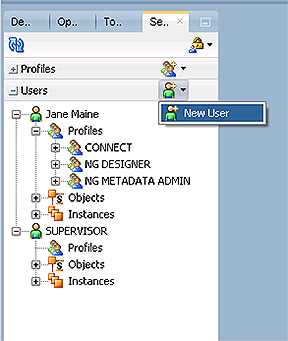
- Expand the 'Users' accordion and click 'New User' to open up the properties window
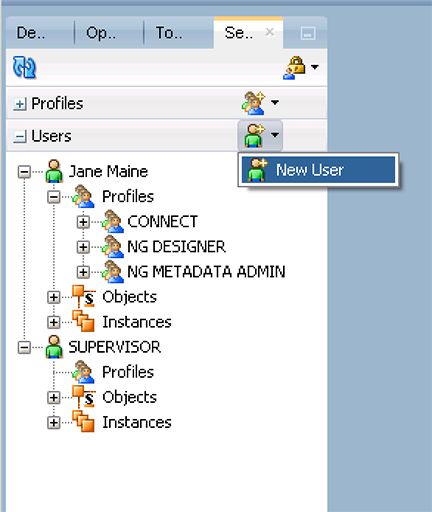
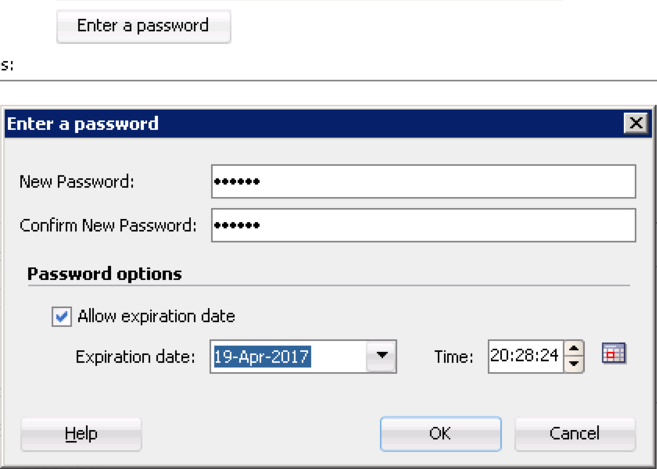
- Input Jane's information and assign her a password (abc123) by clicking 'Enter Password'. Make sure that Jane's password will expire in 6 months, forcing her to change it for security purposes. Click 'OK'
- On the same properties window click the 'Authorization' tab on the top left side. We are granting very limited access because her projects, as a entry level developer, are limited. Click 'Projects' and allow her access to all methods within 'Projects'. Select all methods (use the checkmark in the top left of each objects) from the following: Select SAVE after each object group methods have been selected:
- Column
- Condition
- Diagram
- Folder
- Interface
- Load Plan
- Mapping
- Package
- Procedure
- Procedure Command
- Scenario
- Scenario Variable
- Now we create the User and Profile for a recently hired Senior BI Manager named Will Doe. Following the same steps, create the User by expanding (or locating) the Users accordion and clicking New User. Make sure to set the password to expire in 6 months.
- Unlike the entry level employee, Will Doe needs full access as Senior Manager but he does not need Supervisor access. Check each generic profile (do not check any that start with NG) and click save. Your screen should look similar to the image below.
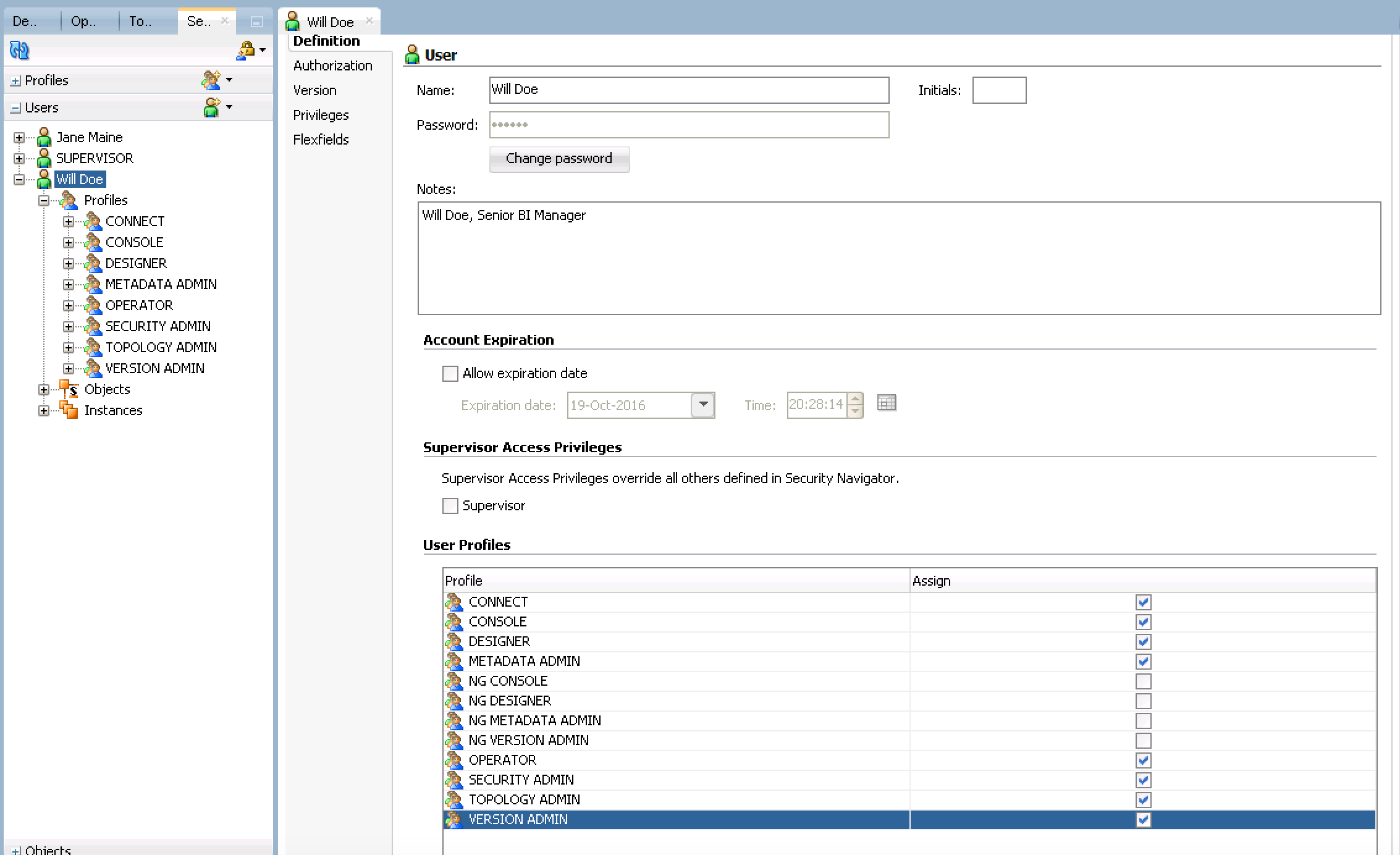
Pro Tip: If you aren't sure your security settings are correct, after your new user/profile is saved, expand the 'Objects' and/or 'Instances' (orange boxes on the screenshots above) under the Users name and see what is available. - Create a new User under the Users accordion. Use the name: 'Consultant', Password: abc123, Notes: Temp consultant for ETL DEV work only.
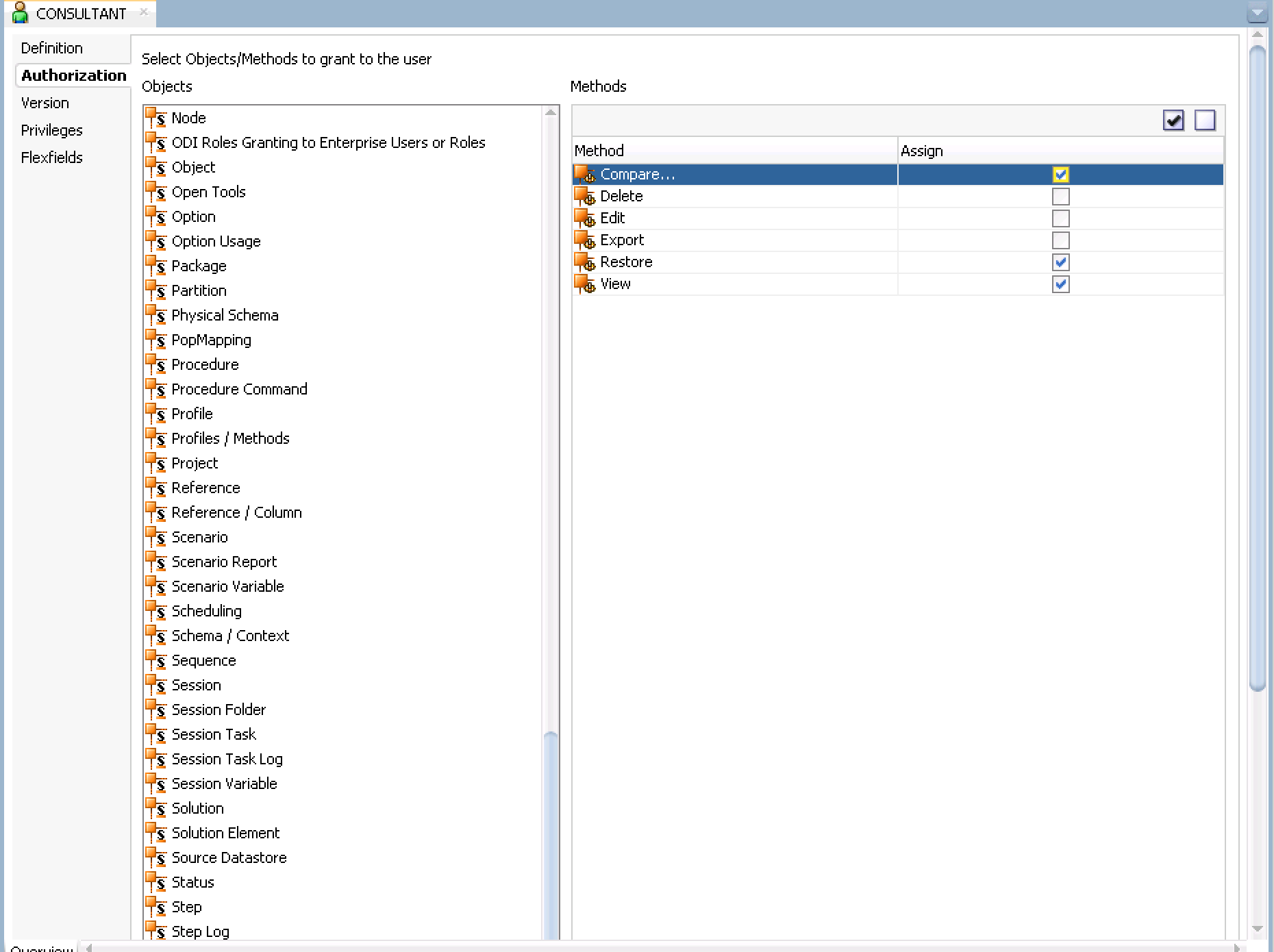
- Click on the 'Authorizations' tab on the top left and scroll down in the objects list and select 'Version' and check only Compare, Restore and View. Click Save. Your image should look similar to below.
- This screenshot shows how Jane Maine can only access Projects and Load Plans, but not any of the models. What are differences you see for your profiles?
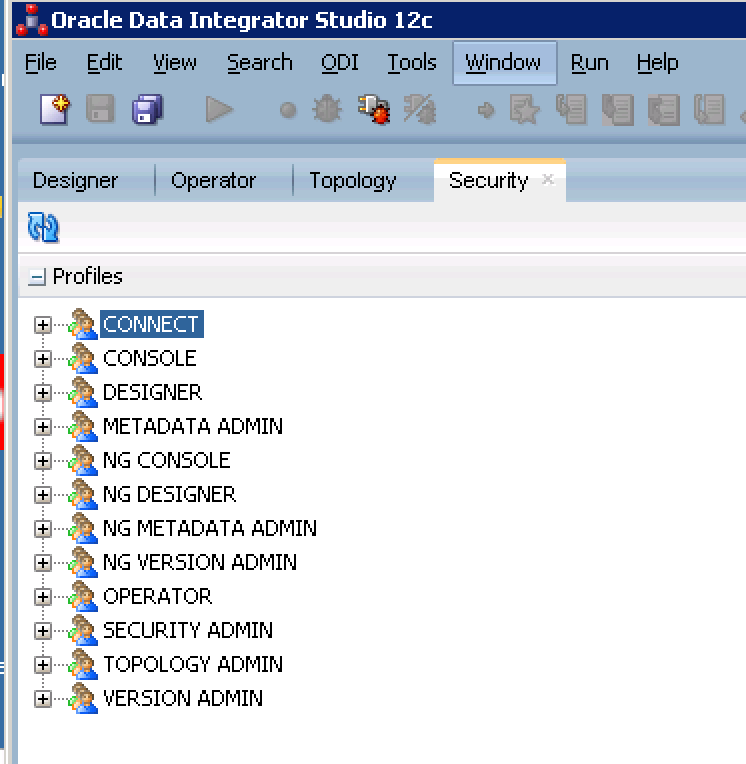
If you do not see it, go to the very top menu and click Window > ODI Security Navigator (seen below)
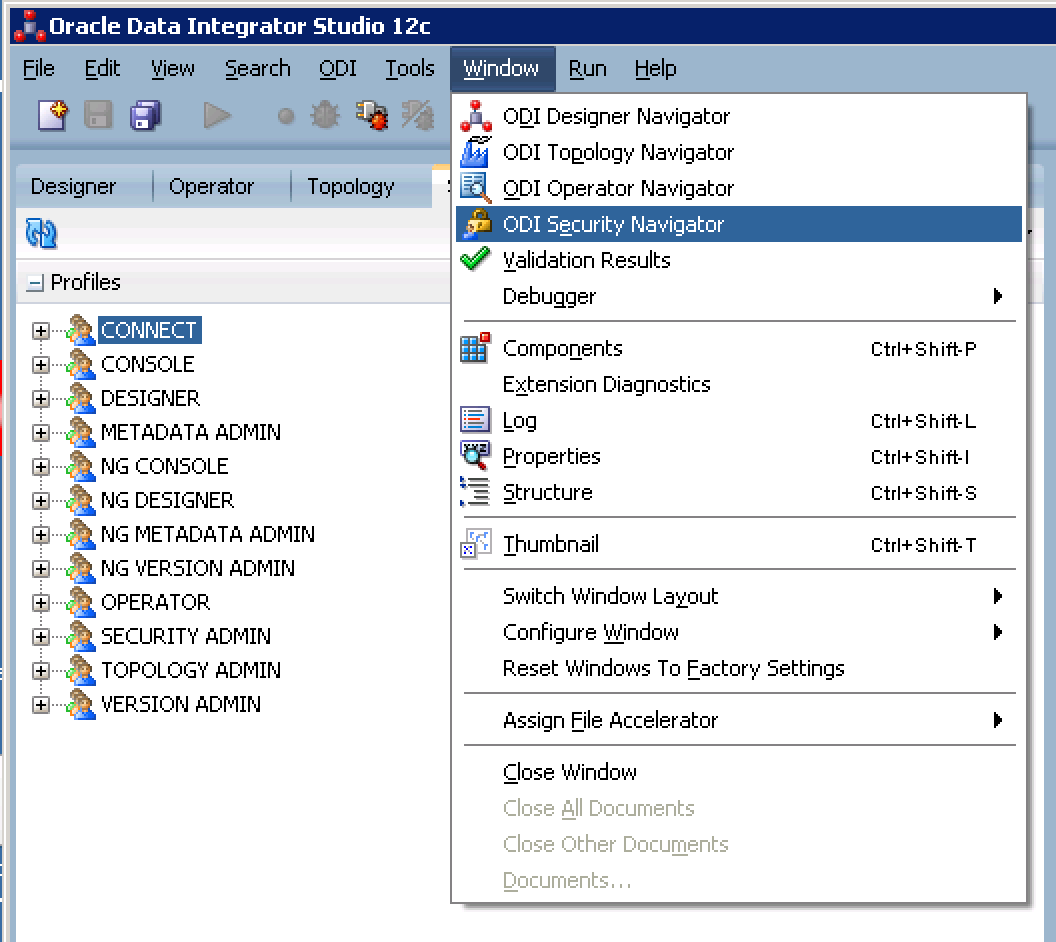
Now we will create the User logins that will be linked to each profile.
Most of you will already have User logins, just double-click the specific 'User Profile' when logged in under the ADMIN or full access account to edit permissions for the User.
Create a login for Jane Maine, our Level I ETL Developer. Assign her the profiles that will allow strictly regulated access in the Designer Navigator to projects and models but allow her view access for everything. (Review the profile descriptions)
We see that in order to limit her development access in DEV to specific projects and models in the Designer Navigator, we must use the non-generic profiles NG_DESIGNER and NG_VERSION_ADMIN. We also must include CONNECT so she has the option to connect to DEV.
Fast Review: An object is a representation of a design-time or run-time artifact handled through Oracle Data Integrator. Examples of objects include agents, projects, models, data stores, scenarios, mappings, and even repositories. An instance is a particular occurrence of an object. For example, the Datawarehouse project is an instance of the Project object. A method is an action that can be performed on an object, such as edit or delete.Generic profiles allow access to all methods of all instances of an object. Non-generic profiles are not authorized for all methods on the instances, an admin must grant rights on the methods for each instance.
Best Practice: Always go in to your account and change any temporary password. See the video on how to do that, here.
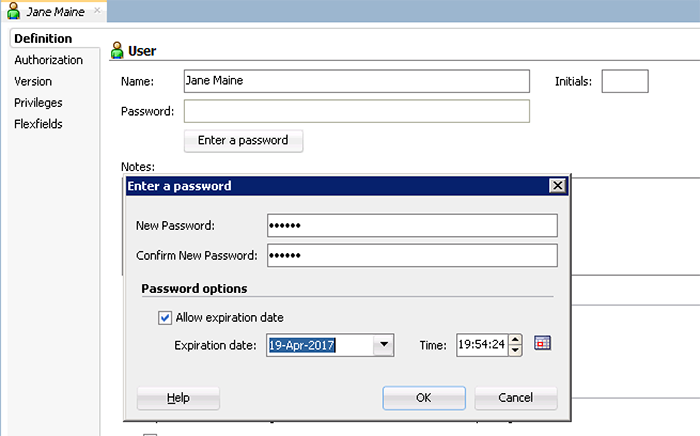
Your screen should now look like this (description is optional - I always add them in):
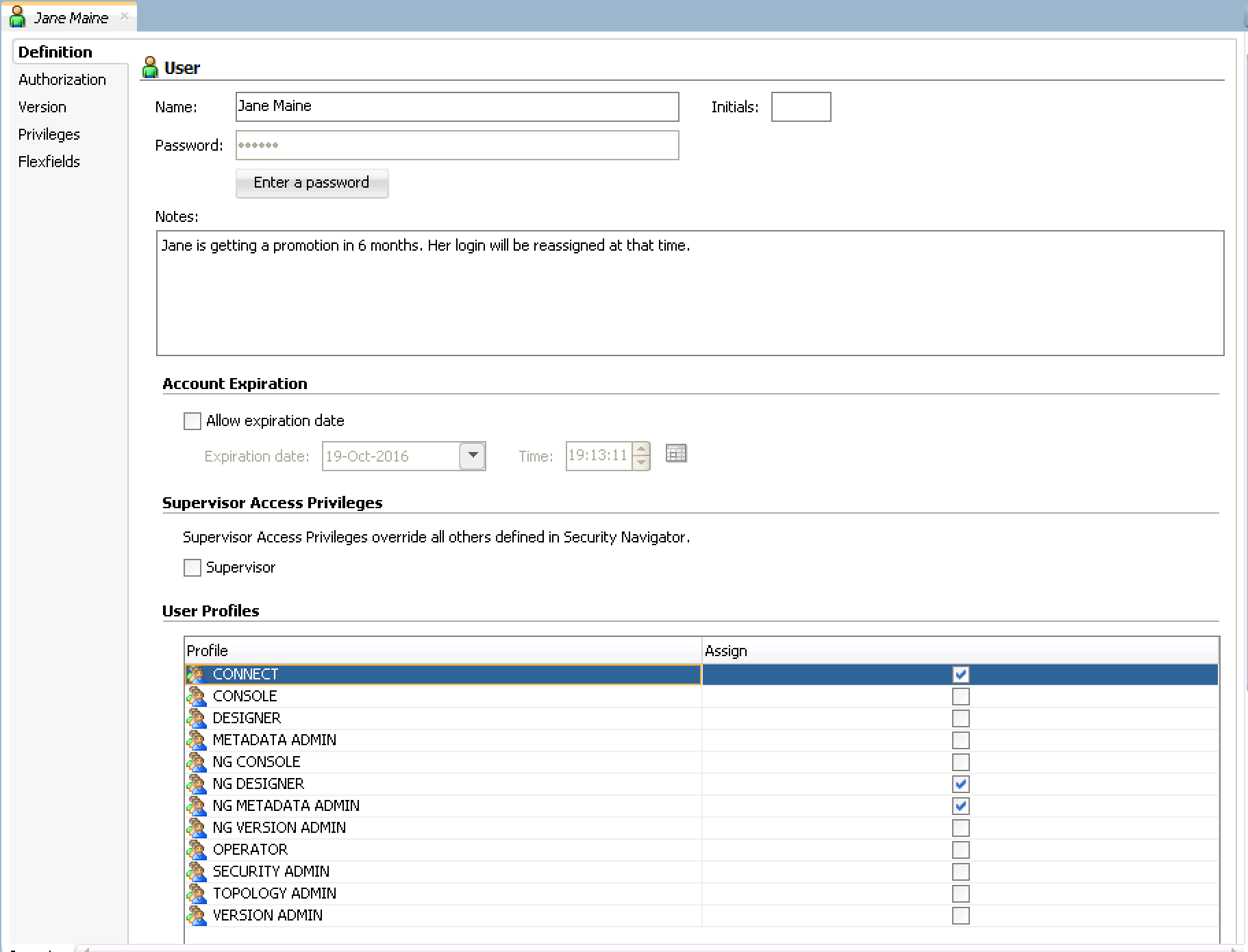
Your Security Navigator should look similar to this:
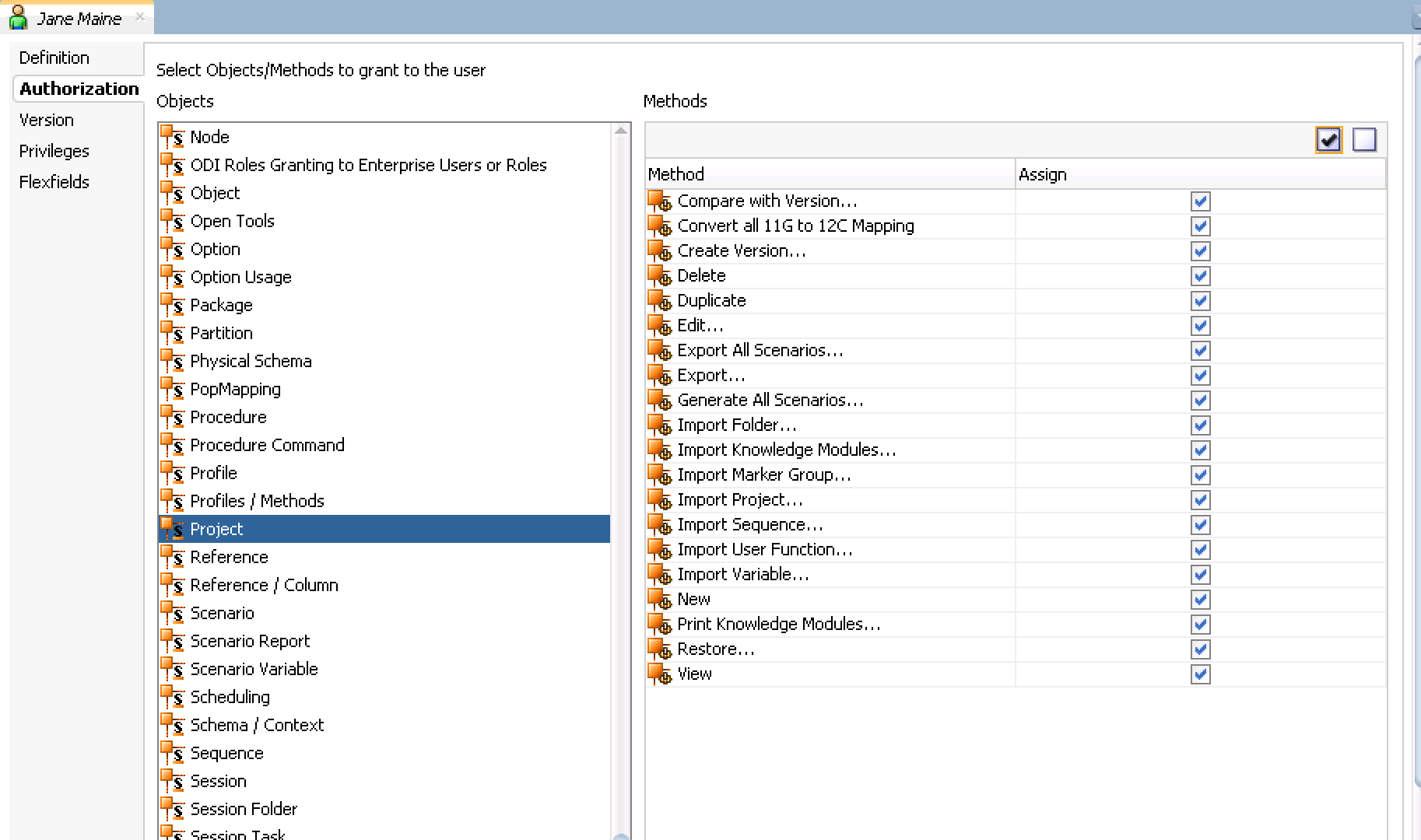
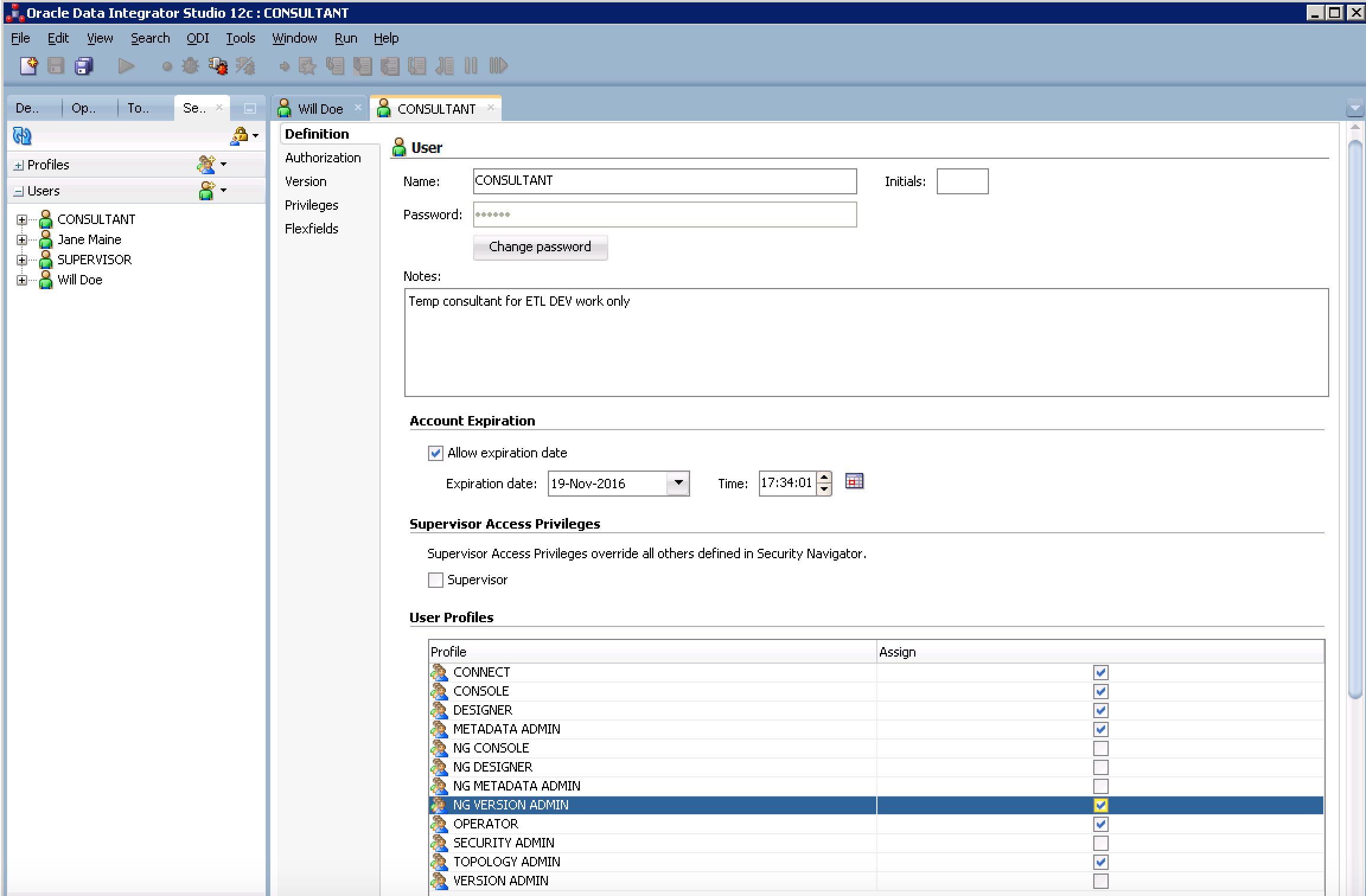
Now we need to create the Consultants general User and profile. The Consultant password does not need to expire, since we will let the account expire after a month.
In this situation, the consultant will need nearly full access but not total access to everything. Check all of the generic profiles EXCEPT version admin. Select the NG VERSION ADMIN to allow selective version access. Your screen should look similar to below.
Now we test our user settings. Disconnect ODI and login using each USER you created. Look at the limitations for each user.
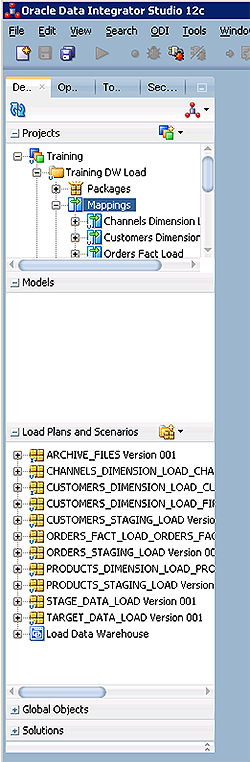
There are so many options for creating secure Users and Profiles within ODI that allow the appropriate amount of access with maximum security - and in fact, it's fairly easy. You can block out high level access such as the entire Operator Navigator or Designer Navigator, all the way down to granular level security where you can block out very specific Methods and Objects associated with it.
A word to the wise: It is strongly suggested that you only use a generic SUPERVISOR or ADMIN account that has full ODI access for creating users, profiles, changing passwords, etc. Create your own personal user/profile to perform daily work. The reason for this is to know who specifically is doing what. If the user is assigned ADMIN (or something generic) then there is no way to tell who used the login.
Other suggested settings to try out: You can create Users and Profiles for admin purposes including a 'Designer Navigator only' access, 'Topology Navigator only' access, 'Operator Navigator only' access and variations where you can only access the Designer Navigator and Toplogy navigator, but not the Operator tab.
OBIEE, Big Data Discovery, and ODI security updates - October 2016
Oracle release their "Critical Patch Update" (CPU) notices every quarter, bundling together details of vulnerabilities and associated patches across their entire product line. October's was released yesterday, with a few entries of note in the analytics & DI space.
Each vulnerability is given a unique identifier (CVE-xxxx-xxxx) and a score out of ten. The scoring uses a common industry-standard scale on the basis of how easy it is to exploit, and what is compromised (availability, data, etc). Ten is the worst, and I would crudely paraphrase it as generally meaning that someone can wander in, steal your data, change your data, and take your system offline. Lower than that and it might be that it requires extensive skills to exploit, or the impact be much lower.
A final point to note is that the security patches that are released are not available for old versions of the software. For example, if you're on OBIEE 11.1.1.6 or earlier, and it is affected by the vulnerability listed below (which I would assume it is), there is no security patch. So even if you don't want to update your version for the latest functionality, staying within support is an important thing to do and plan for. You can see the dates for OBIEE versions and when they go out of "Error Correction Support" here.
If you want more information on how Rittman Mead can help you plan, test, and carry out patching or upgrades, please do get in touch!
The vulnerabilities listed below are not a comprehensive view of an Oracle-based analytics/DI estate - things like the database itself, along with Web Logic Server, should also be checked. See the CPU itself for full details.
Big Data Discovery (BDD)
- CVE-2015-3253
- Affected versions: 1.1.1, 1.1.3, 1.2.0
- Base score: 9.8
- Action: upgrade to the latest version, 1.3.2. Note that the upgrade packages are on Oracle Software Delivery Cloud (née eDelivery)
OBIEE
- CVE-2016-2107
- Affected versions: 11.1.1.7.0, 11.1.1.9.0, 12.1.1.0.0, 12.2.1.1.0
- Base score: 5.9
- Action: apply bundle patch 161018 for your particular version (see MoS doc 2171485.1 for details)
BI Publisher
- CVE-2016-3473
- Affected versions: 11.1.1.7.0, 11.1.1.9.0, 12.2.1.0.0
- Base score 7.7
- Action: apply patch per MoS doc 2171485.1
ODI
-
- Affected versions: 11.1.1.7.0, 11.1.1.9.0, 12.1.3.0.0, 12.2.1.0.0, 12.2.1.1.0
- Base score: 5.7
- The
getInfo()ODI API could be used to expose passwords for data server connections. - More details in MoS doc 2188855.1
-
- Affected versions: 11.1.1.7.0, 11.1.1.9.0, 12.1.2.0.0, 12.1.3.0.0, 12.2.1.0.0, 12.2.1.1.0
- Base score: 3.1
- This vulnerability documents the potential that a developer could take the master repository schema credentials and use them to grant themselves SUPERVISOR access. Even using the secure wallet, the credentials are deobfuscated on the local machine and therefore a malicious developer could still access the credentials in theory.
- More details in MoS doc 2188871.1
OBIEE, Big Data Discovery, and ODI security updates - October 2016
Oracle release their "Critical Patch Update" (CPU) notices every quarter, bundling together details of vulnerabilities and associated patches across their entire product line. October's was released yesterday, with a few entries of note in the analytics & DI space.
Each vulnerability is given a unique identifier (CVE-xxxx-xxxx) and a score out of ten. The scoring uses a common industry-standard scale on the basis of how easy it is to exploit, and what is compromised (availability, data, etc). Ten is the worst, and I would crudely paraphrase it as generally meaning that someone can wander in, steal your data, change your data, and take your system offline. Lower than that and it might be that it requires extensive skills to exploit, or the impact be much lower.
A final point to note is that the security patches that are released are not available for old versions of the software. For example, if you're on OBIEE 11.1.1.6 or earlier, and it is affected by the vulnerability listed below (which I would assume it is), there is no security patch. So even if you don't want to update your version for the latest functionality, staying within support is an important thing to do and plan for. You can see the dates for OBIEE versions and when they go out of "Error Correction Support" here.
If you want more information on how Rittman Mead can help you plan, test, and carry out patching or upgrades, please do get in touch!
The vulnerabilities listed below are not a comprehensive view of an Oracle-based analytics/DI estate - things like the database itself, along with Web Logic Server, should also be checked. See the CPU itself for full details.
Big Data Discovery (BDD)
- CVE-2015-3253
- Affected versions: 1.1.1, 1.1.3, 1.2.0
- Base score: 9.8
- Action: upgrade to the latest version, 1.3.2. Note that the upgrade packages are on Oracle Software Delivery Cloud (née eDelivery)
OBIEE
- CVE-2016-2107
- Affected versions: 11.1.1.7.0, 11.1.1.9.0, 12.1.1.0.0, 12.2.1.1.0
- Base score: 5.9
- Action: apply bundle patch 161018 for your particular version (see MoS doc 2171485.1 for details)
BI Publisher
- CVE-2016-3473
- Affected versions: 11.1.1.7.0, 11.1.1.9.0, 12.2.1.0.0
- Base score 7.7
- Action: apply patch per MoS doc 2171485.1
ODI
-
- Affected versions: 11.1.1.7.0, 11.1.1.9.0, 12.1.3.0.0, 12.2.1.0.0, 12.2.1.1.0
- Base score: 5.7
- The
getInfo()ODI API could be used to expose passwords for data server connections. - More details in MoS doc 2188855.1
-
- Affected versions: 11.1.1.7.0, 11.1.1.9.0, 12.1.2.0.0, 12.1.3.0.0, 12.2.1.0.0, 12.2.1.1.0
- Base score: 3.1
- This vulnerability documents the potential that a developer could take the master repository schema credentials and use them to grant themselves SUPERVISOR access. Even using the secure wallet, the credentials are deobfuscated on the local machine and therefore a malicious developer could still access the credentials in theory.
- More details in MoS doc 2188871.1